Wednesday, April 15, 2020

What’s the Best Tech Stack for Mobile App Development?


To make your mobile application development project rewarding and successful, choosing the right mobile technology stack is vital. The technology stack not only gives your project life but also makes it maintainable, scalable, and committed to your functional requirements. An appropriate mobile stack may result in lower costs and less time for mobile: IOS / Android app development UK and around the world. We review the most popular mobile app development approaches and the advanced tech stacks you can use to implement them.

Native app development

Native app development means using platform-specific programming languages, software development kits, development environments, and other tools provided by operating system vendors. As a result, building native apps for several platforms requires you to employ separate mobile app development technologies for each. Popular apps like Lyft and Pokemon GO take the native approach.

Technology stack for iOS apps in 2020

If you want to create a native application for iOS, you should consider the following mobile app technology stack:

Programming languages: Objective-C, Swift

For building an iOS app you can choose either Objective-C or Swift. Objective-C is a superset of the C programming language and provides object-oriented capabilities and a dynamic runtime environment.
However, we recommend using Swift since it’s more functional, provides code that’s less error-prone because of its inline support for manipulating text strings and data, and contains dynamic libraries that are directly uploaded to memory, cutting down on the initial size of the app and ultimately increasing app performance. Our iOS developers use Swift, and have recently created their own watermark library for video and image overlays, called MediaWatermark. This library can be integrated and installed quickly and efficiently, letting you put watermarks on videos and images.

Toolkit: Apple Xcode

If you choose Swift for your iOS app, then you’ll need Apple Xcode as the toolkit for developing your native app. This full-featured development environment lets you create mobile apps as well as desktop applications. Xcode comes with integrated support for Git repositories, a graphical editor to build user interfaces, instrumentation and debugging tools, and integrated documentation.

SDK: iOS SDK

The iOS SDK includes an application programming interface (API) that serves as a link between software applications and the platform they run on. APIs can be built in many ways and include helpful programming libraries and other tools. The iPhone SDK provides tools for Apple’s touchscreen interface and for its proprietary iOS operating system, which is used to run Apple’s iPhones as well as Apple’s other mobile devices such as the iPad.

Android technology stack in 2020

If you decide to build a native application for Android, pay attention to the following mobile development technologies:

Programming languages: Java, Kotlin

For developing a native Android mobile app you can use Java or Kotlin. Java is a reputable programming language with vast open-source tools and libraries to help developers. However, Kotlin has become a more stable and congruous development option for Android Studio. There are definite limitations within Java that impede Android API design. Kotlin is inherently lightweight, clean, and far less verbose. In other words, Kotlin was specifically designed to improve existing Java models by offering solutions to API design deficiencies. That’s why our Android team prefered Kotlin for our mobile app Scrummer. As a result, we got a fully operational mobile app with smooth transitions between screens and animated micro-interactions.

Toolkit: Android Studio & Android Developer Tools

Android Studio provides code editing, debugging, performance tooling, a flexible build system, and an instant build/deploy system. It allows you to focus on building unique and high-quality apps.
With the help of Android Developer Tools (ADT), you gain full support for Android app development. Besides offering Android-specific coding support, ADT lets developers use various on-device debugging tools, a graphical UI builder, emulators, and fully scriptable test automation support.

SDK: Android SDK

To write programs with the latest features, developers must download and install each version SDK for a particular phone. The components of the Android SDK can be downloaded separately. Third-party add-ons are also available for download.
Both Apple and Google provide app developers with their own development tools, interface elements, and SDKs. Before choosing native app development, let’s look at the pros and cons of this approach.
Pros and cons of native app development

Cross-platform app development

This approach means developing mobile apps that can be used on multiple mobile platforms. A cross-platform approach allows developers to use a single code base, so mobile apps are developed for different platforms simultaneously and are adapted to the majority of devices.

Technology stack for cross-platform apps

There are different frameworks for cross-platform app development. Let’s consider some of them:

React Native + JavaScript/TypeScript

React Native is a JavaScript framework for writing mobile applications that look and feel native on both iOS and Android. React Native uses the same fundamental UI building blocks as regular iOS and Android apps. You just put those building blocks together using JavaScript and React. React Native introduces a novel, radical, and highly functional approach to constructing user interfaces. With React Native, your application logic is written and runs in JavaScript, whereas your application UI is fully native. Great examples of such apps are Instagram and Skype.
You can also use the TypeScript language to build your cross-platform application. Typescript provides some nice features for quick and easy error detection when writing React components. Generic components are useful in the TypeScript toolbox. They can provide an extra level of safety when writing components, tightening the feedback loop and helping you find errors quickly.

Xamarin + C#

Xamarin is a tool for cross-platform mobile app development that allows engineers to share about 90 percent of code across major platforms. Xamarin uses C# as the main language for cross-platform development. C# is a statically typed language with mature tooling and IDE support. Apps written in C# are cross-compiled to native Android and iOS binaries. It’s even possible to use device-specific APIs and functionality from within C# code. For example, apps like Slack and Pinterest are built with Xamarin.
Now let’s look at the pros and cons of cross-platform app development.
Pros and cons of cross-platform app development

Hybrid app development

Hybrid development makes use of standard web technologies and tools like HTML5, CSS, and JavaScript. The shared code is then wrapped in a native container, which can be done using various tools, and shipped as a regular app. Such apps function like websites, fundamentally, somewhere between an app and a page rendered in a browser. Untappd and McDonald's Türkiye are examples of hybrid applications.

Technology stack for hybrid apps

Let’s consider the existing frameworks for hybrid app development and find out how they work.

Cordova/PhoneGap

Apache Cordova is an open-source framework to run HTML/JavaScript-based applications inside a special native container on a mobile device. Native device functionality is exposed via JavaScript APIs, and HTML-based applications can thus access device-specific functionality like sensors and cameras. Fortunately, developers don’t have to rely only on HTML and CSS to build the user interface, as PhoneGap supports numerous frameworks and libraries including jQuery, AngularJS, and Knockout.js.

Ionic

Ionic is an AngularJS-based framework, which is why it shares a whole set of advantages and a supporting community with the famous framework. The critical ability to make hybrid apps have a native look is also well implemented. For instance, Ionic reuses DOM elements to handle one of the reasons for poor mobile performance.
If you’re thinking of using a hybrid approach, first consider its pros and cons.
Pros and cons of hybrid app development

Factors to consider when choosing a technology stack

You have a rich choice of technology stacks for mobile applications, but which one is right for you to use in your app development project? It’s important to have a solid plan in mind when choosing a mobile app stack if you want to have not only professional, functional software but something more like maintainability, scalability, and security.
There are a lot of things to consider when trying to choose the right mobile application technology. These are the main considerations.

Type of project

This is the vital determinant when choosing a mobile development technology stack for your mobile application. For example, if you’re planning to create a complex mobile app with great performance and a completely custom, platform-specific UI implementation, then you should go native. In such cases, Kotlin or Swift are the commonly used programming languages.

Validating an idea

If you’re a startup and just want to validate your product idea, engage your potential users, and stay one step ahead of your competitors, choose a cross-platform approach. React Native will be a good choice, for example, since it’s cost-effective and allows you to reuse code on various platforms, which means wide platform coverage and fast app delivery.

Time to market

The speed at which companies can introduce products to the market is critical for sustaining a competitive advantage. If you want to speed up product development, consider a language or framework with an abundance of ready-made solutions for common development tasks,such as authentication and social media integrations.

Wrapping up

Mobile app development will continue to grow as more and more enterprises adopt mobile technologies. If you want to create a highly functional mobile app, choosing the right mobile app technology is the key ingredient.

Monday, April 13, 2020

Web Application Development - Guides, Resources, and Best Practices


Simply put, Web Applications are dynamic web sites combined with server side programming which provide functionalities such as interacting with users, connecting to back-end databases, and generating results to browsers.
Examples of Web Applications are Online Banking, Social Networking, Online Reservations, eCommerce / Shopping Cart Applications, Interactive Games, Online Training, Online Polls, Blogs, Online Forums, Content Management Systems, etc..

Technologies

There are two main categories of coding, scripting and programming for creating Web Applications:
I. Client Side Scripting / Coding - Client Side Scripting is the type of code that is executed or interpreted by browsers.
Client Side Scripting is generally viewable by any visitor to a site (from the view menu click on "View Source" to view the source code).
Below are some common Client Side Scripting technologies:
  • HTML (HyperText Markup Language)
  • CSS (Cascading Style Sheets)
  • JavaScript
  • Ajax (Asynchronous JavaScript and XML)
  • jQuery (JavaScript Framework Library - commonly used in Ajax development)
  • MooTools (JavaScript Framework Library - commonly used in Ajax development)
  • Dojo Toolkit (JavaScript Framework Library - commonly used in Ajax development)

II. Server Side Scripting / Coding - Server Side Scripting is the type of code that is executed or interpreted by the web server.
Server Side Scripting is not viewable or accessible by any visitor or general public.
Below are the common Server Side Scripting technologies:
  • PHP (very common Server Side Scripting language - Linux / Unix based Open Source - free redistribution, usually combines with MySQL database)
  • Zend Framework (PHP's Object Oriented Web Application Framework)
  • ASP (Microsoft Web Server (IIS) Scripting language)
  • ASP.NET (Microsoft's Web Application Framework - successor of ASP)
  • ColdFusion (Adobe's Web Application Framework)
  • Ruby on Rails (Ruby programming's Web Application Framework - free redistribution)
  • Perl (general purpose high-level programming language and Server Side Scripting Language - free redistribution - lost its popularity to PHP)
  • Python (general purpose high-level programming language and Server Side Scripting language - free redistribution)

Program Libraries

Program libraries are a collection of commonly used functions, classes or subroutines which provide ease of development and maintanance by allowing developers to easily add or edit functionalities to a frameworked or modular type application.

Web Application Frameworks

Web Application Frameworks are sets of program libraries, components and tools organized in an architecture system allowing developers to build and maintain complex web application projects using a fast and efficient approach.
Web Application Frameworks are designed to streamline programming and promote code reuse by setting forth folder organization and structure, documentation, guidelines and libraries (reusable codes for common functions and classes).

Web Application Frameworks - Benefits and Advantages

  • Program actions and logic are separated from the HTML, CSS and design files. This helps designers (without any programming experience) to be able to edit the interface and make design changes without help from a programmer.
  • Builds are based on the module, libraries and tools, allowing programmers to easily share libraries and implement complex functionalities and features in a fast and efficient manner.
  • The structure helps produce best practice coding with consistent logic and coding standards, and provides other developers the ability to become familiar with the code in a short time.

Coding Guidelines, Standards & Convention

Coding guidelines are sets of rules and standards used in programming a web application project.

These rules and standards apply to coding logic, folder structure and names, file names, file organization, formatting and indentation, statements, classes and functions, and naming conventions. These rules also enforce writing clear comments and provide documentation.

Important benefits of using Coding Guidelines

  • Creates the best environment for multiple programmers to work on the same project
  • Provides ease of maintainability and version management
  • Delivers better readability and understanding of the source code
  • Insures that other developers can understand and become familiar with the code in a short time

Web Applications Lifecycle Model

Web Application Lifecycle is the process of developing a web application and involvement of the multiple teams that are engaged in the development process. Each organization may set forth its own unique style of operating.
Some companies follow a certain standard model such as SDLC (System Development Life Cycle) or Agile Software Development Model.
  • SDLC is the traditional process of developing software or web applications by including research to identify and define the application requirements, information analysis, architectural design and specifications blueprint, team involvement, programming, testing and bug fixing, system testing, implementation and maintenance.
  • Agile Software / Web Application Development is the iterative development process and development process practices that focus on collaboration of people involved and provide a better procedure to allow revisions and evolution of web application requirements. Agile methodology includes research, analysis, project management, design, programming, implementation, frequent testing, adaptation and maintenance.

Web Application Development Process

Web Application Development Process organizes a practical procedure and approach in application development.
The following list of procedures and suggested documents provide a good outline for a Web Application Lifecycle and Process:
  • Roadmap Document: Defining Web Application, Purpose, Goals and Direction
  • Researching and Defining Audience Scope and Security Documents
  • Creating Functional Specifications or Feature Summary Document
  • Team Collaboration and Project Management Document
  • Technology Selection, Technical Specifications, Illustrative Diagram of Web Application Architecture and Structure, Development Methodology, Versions Control, Backups, Upgrades, Expansion and Growth Planning Document, Server Hardware / Software Selection
  • Third Party Vendors Analysis and Selection (Merchant Account and Payment Gateway, SSL Certificate, Managed Server / Colocated Server Provider, Fulfillment Centers, Website Visitor Analytics Software, Third Party Checkout Systems, etc.)
  • Application Visual Guide, Design Layout, Interface Design, Wire Framing
  • Database Structure Design and Web Application Development
  • Testing: Quality Assurance, Multiple Browser Compatibility, Security, Performance - Load and Stress Testing, Usability
  • Maintenance

Web Application Testing

Testing is an important part of the Web Application Development process. On occasion, testing would consume more manpower and time than development itself.
Below are some of the most common testing needed for any web application development process:
  • Quality Assurance and Bug Testing
  • Multiple Browser Compatibility
  • Application Security
  • Performance - Load and Stress Testing
  • Usability

Trends and Popularity

The demands for companies to build Web Applications are growing substantially.
If planned and built correctly, web applications can:
  • Reach and service millions of consumers and businesses
  • Generate substantial, multi-layer / multi-category income from consumers, businesses and advertisers
  • Easily build business goodwill and assets based on audience reach, popularity, technology and potential growth

Below are good reasons for companies to build web applications:
  • Companies want to streamline their internal departments and functions, operations, sales and project management, etc.
  • Companies want to take advantage of a web based application's flexibility and versatility, by moving away from the traditional desktop application platform to the web application platform
  • Companies want to gain more clients or better service their current clients by offering convenient services and solutions online
  • Companies want to build new web applications to offer innovative services or solutions to online users and businesses

Business Impact

Today's web applications have substantial business impact on the way companies and consumers do business such as:
  • There are opportunities to gain the upper hand and bypass the traditional brick and mortar companies when this type of opportunity was rarely possible or existed before the explosion of the web
  • The new web created a global business environment which challenges the way in which traditional companies do business
  • Companies need to reinvent and evolve in order to compete in today's trends, online business and global marketplace
  • Businesses and consumers have more options and resources to research and easily compare and shop around for the best deals
  • Information and resources are immense and available to everyone who seeks it
  • Businesses or companies who used to profit from consulting or advice, that can now be easily acquired online are struggling, and will need to take a new business direction if they want to stay solvent.

Thursday, April 9, 2020

5 Ways Mobile Apps Can Help You Grow Your Business


Times have truly changed and it’s imperative for any business to quickly adapt with the latest technological developments. Noticeably, iPhone apps and other mobile applications are taking the world by storm. And majority of smart, forward-thinking entrepreneurs are taking advantage of this mobile apps phenomenon to further improve their business. Here are 5 ways mobile apps can help you grow your business:


1.       Boost branding – Since your company’s logo and or slogan are visible on your customers’ mobile screens, it’s virtually impossible not to remember you whenever they need your products/services. It also offers a definite advantage against your competitors who are yet to adopt this business strategy. If you want an instant brand boost or recognition, creating a mobile application is a great way to help improve your corporate branding and overall reputation.
2.       Improve customer service experience – Your customers can benefit from being able to access your products/services anytime they want and while on the fly. This is especially true if you don’t have a help line that’s available 24/7. Your app can include a feature where they can contact you day or night, and without necessarily going to your website.
3.       Act as a marketing tool – More than just an application, a mobile app can double as a valuable marketing tool. How? It can be easily integrated with Facebook, Twitter, Foursquare and other social media sites. That means, with a single tap, customers can share with their network your app and or their experience with your company, which can then offer you free publicity. Plus, using push notification, you can quickly send upcoming promotions or special events to your customers and prospects.
4.       Acquire more customers – Keep in mind that today’s consumers are constantly moving and are addicted to their mobile devices. Undoubtedly, they would appreciate a useful and engaging mobile app from your company. If your app helps them save or kill time or is just that awesome, they would even refer you to their friends and family.
5.       Generate more income – A mobile application with order fulfillment ability can readily provide another revenue channel, aside from your website and or brick and mortar store. For example, functionality to make restaurant reservations, book concert tickets, buy goods and services, etc. are possible with a few taps/clicks. But wait, there’s more! You can also earn by charging app users when they upgrade, or by offering in-app advertisements, etc.
Unfortunately, many business owners are yet to recognize the huge potential benefits of mobile applications in terms of boosting productivity, efficiency, competitive edge and user experience. Been pondering how you can possibly grow your business? Mobile apps just might be the answer. See: Android app development uk and around the world by GoodCore Software.

Monday, April 6, 2020

Boost Your Business with Custom On-Demand Mobile Apps

From Pizza Hut to TaskRabbit, we live in the age of on-demand apps. For those who have little or no idea about the on-demand apps, they are like mediators between customers and service providers. These apps provide an easy, convenient, and quick way to get specific services. As such apps can save a lot of time and efforts, users like on-demand apps greatly. A Harvard Business Review study has revealed that the number of on-demand consumers is on the rise, and they include all age groups led by millennials. What’s more, almost 39 percent consumers who prefer on-demand apps reside in towns or rural zones.
Today, the on-demand economy is surging globally while covering the service sector ranging from hospitality to transportation, and grocery to online marketplaces. It is fair to mention that the custom on-demand app development domain is all set to offer ample of benefits to the enterprises while assisting them to serve their customers in a better way.
Sectors that can take benefits of on-demand services app
Here we mention a few notable industry sectors that can leverage the benefits of on-demand applications:
1. Hospitality
Be it ordering the food or booking the table, a restaurant can provide their customers all the facilities online. If you own a restaurant, you can make ordering and delivery process simple with a custom restaurant app. When your customers order an item, you can deliver it really quick with such app.
2. Health and Fitness
This is a vast sector that includes all the aspects related to living a healthy life. People prefer a fitness trainer app or a medical help app these days, and if you are in a healthcare business or own a gym, you can expand your business manifold by having a customized app.
3. Transportation
Cab-hailing apps are much in demand as people seek convenient mean of transportation. You can manage your fleet effectively with an app if you are in logistics business. Apart from transportation and logistics, the courier companies can also get an edge over their competitors with a feature-rich mobile application.
4. Online Marketplaces
As our shopping pattern is influenced by mobile devices, online marketplaces can get the most of an on-demand app. You can boost your online retail business with a dedicated app while providing a pleasant shopping experience to your customers.
That’s not all. Other sectors like utility, music, etc. can also provide various services by using such apps.
How to Make On-demand App Successful
You may wonder how you can make your on-demand app successful. Here we give you three tips that can help you increase the reach of your app and you can get a higher RoI:
  • Flexibility
On-demand apps need to be flexible to address the changing user requirements. Also, you should offer a 24/7 assistance. Your app should also scalable so that you can add additional features and functionality in the future to keep your app updated.
  • Technology Integration
When you contact a reputed mobile/ android app development company UK or around the world, you will get insight into the market trends and technological advancements in the mobile app domain. It is necessary for your app to provide a pleasant user experience with the simple yet intuitive interface and seamless performance. You can do so by integrating the latest technology.
  • Pricing Strategy
It is a bit difficult to determine the monetary value of your on-demand app. When you provide online services with the utmost convenience and doorstep delivery, you can take some charge or fees. But then, you should consider your competitors’ strategy regarding pricing because people hate expensive apps and services. You should also keep your targeted audience in mind while deciding charge. The right pricing can ensure the success of your app.
How much it costs to develop on-demand apps
Just like other customized mobile apps for business, the cost of on-demand applications primarily depends on features and hourly rate. There is a huge difference in the hourly rates for on-demand app development across different geographic regions. For example, North American countries (Canada and the US) have the highest hourly rates up to $150/hour whereas India and a few Asian countries have the lowest development rates at $25 or more for on-demand applications.
Typically, the on-demand mobile apps include the following features:
– Booking or Reservation
– List of Order or Requests
– Navigation
– Payment Gateway
– Order or Delivery Confirmation
– Push Notifications
– Price of Fare Calculation
Considering market research, feature integration, duration, and hourly rates, the price of an on-demand app starts from $5000 and goes up to $50000.
Wrapping Up
An on-demand service app can help your business thrive amid intensifying competition. You can attract more people toward your business and establish your brand with ease. Even a startup can stand ahead of the curve through offering an on-demand application.
What is your take on an on-demand mobile app? Do you want to grab the opportunities it offer?

Thursday, April 2, 2020

How to Effectively Manage an Offshore Development Team


So, you’ve just signed a contract with a software development company UK or anywhere around the world. You’ve tapped into the secret weapon of the modern tech industry. Top-tier talent at bargain prices.
Time to kick back and wait for your new app to show up on your doorstep, right?
Sadly, no. Hopefully this doesn’t come as a surprise, but you still need to work with your team and guide the development process to success.
Learning how to manage offshore developers carries some unique challenges and differences from a local office, but it’s just as important.
Just like local employees, remote workers are usually only as effective as your leadership.
In this article, we’ll go through some tips and best practices for managing offshore resources, to make sure your investment pays off.
You’ll learn:
  1. How to communicate with a team in another country, and keep them as engaged and in the loop as your local employees.
  2. Why you should take a trip to the remote office once a year, and what you should do while you’re there.
  3. The real secret to project management for offshore teams, smoothing out speed bumps before they impact workflow.

How to Communicate with Offshore Teams

Good communication starts during the partner selection process, before you’ve even signed a contract. We’ve written previously on how to choose an offshore development team, and a big part of it is ensuring a common language and time zone.
The manager’s duty doesn’t end there, though.
You still need to make sure your office and the remote team are communicating well, and that goes for the entire development process.
Here are a few things you can do to make that happen.

Software for Remote Collaboration

Offshoring and outsourcing become more common every year, and there are dozens of software solutions to make it easy and effective to keep remote workers in the loop.
Since a large percentage of your workforce might be located in a different country, it’s vital to find a way to make meetings and conferences work despite vast geographical differences.
Look for a software package with a full range of collaboration features. File sharing, secure live and asynchronous messaging, collaborative editing, and voice and video chat are all essential to keeping a remote team well-integrated.
One of our favorites is Google’s G Suite. Others swear by Slack, or Microsoft SharePoint.
The best part? Most of these software suites won’t cost you much at all!

Use Agile

The field of project management has taken off in the past few years, and today there are several models, or methodologies, that can be used to structure teams for maximum productivity.
By far, the most popular is Agile, with an adoption rate growing year over year for over a decade. An industry survey conducted in 2018 found that over 97% of responding organizations use Agile in some form, with 25% relying on it exclusively.
So how does Agile work?
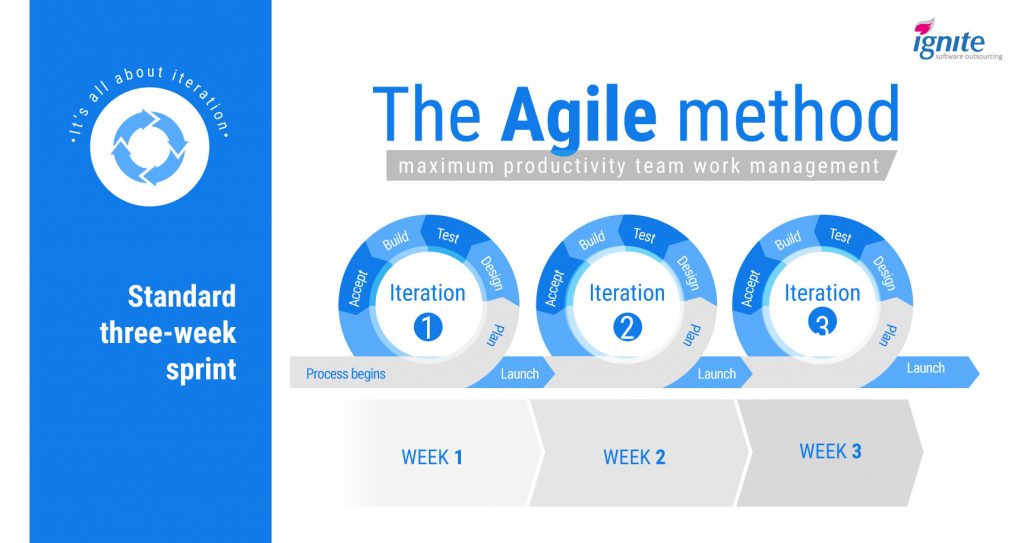
Basically, it’s about iteration. Instead of scoping out a project and then hunkering down until it’s complete, an Agile team will continuously deliver small chunks over set time intervals, called sprints.
At Ignite, we’ve found that three-week sprints work well, and that’s our standard operating procedure.
How to Manage an Offshore Team - the Agile method
The result is that managers can keep a tight focus on how a project is evolving, and catch problems early, before they cause lasting damage.
This is perfect for managing offshore developers, since it requires tight communication throughout the entire process.
In other words, there won’t be an opportunity for your office to fall out of touch with the remote team, and that means the communication issues won’t develop in the first place.

Emphasize Video

There’s a hierarchy to Internet communications.
At the bottom is text. That can take the form of text messages, online chat, or emails. Misunderstandings are common, and that holds true for offshore teams as well. It’s best used for quick updates, nothing more.
Audio is better for engagement, but it’s still not ideal. Phone calls are never going away, but it’s been found that 70% of communication is nonverbal.
That’s why for crucial meetings and status calls, of which you should have plenty with your offshore team, video is king.
There’s no replacing face-to-face communication, and when your workers are spread across the globe, video calls are the closest you can get.
Skype is still the most popular software for video conferencing, though it has plenty of competition these days.
Even with modern video conferencing, it’s still a good idea to meet with your remote workers in person regularly. Let’s get into that now.

Visiting Offshore Team

A good offshore development team represents an ongoing relationship.
Although it’s technically possible to outsource a single project and then be done, this is a mistake.
The real value in an offshore development team is in making them an integral part of your company, so they can learn the ins and outs of the business and gain a true understanding of your strategic goals.
To foster this, it’s important to make an appearance at the remote office, in person, about once a year.
Here’s what you should do while you’re there.
The reverse also works; you might want to invite some portion of the remote team to come work at your local office for a few days.

Use Teambuilding

Think of these visits primarily as a teambuilding exercise.
Although it’s a good opportunity to work through operational challenges as well, you’ll find that the real value here is in getting to know the remote workers, letting them get to know you, and making them feel like a valued part of your business.
You’ll be rewarded with vastly increased engagement, and workers who actually understand and care about what they’re doing for you.
Use this time to get to know the remote workers, listen to the challenges they face, and brainstorm ways to integrate them more tightly into your operations.

Listen

Remember that this visit is likely the only time the entire remote team will have access to you.
A well-organized outsourcing operation will utilize a project manager as the single point of contact, except for when you’re physically present.
Consider taking a tour of the office, hosting the workers for a meal, or even an overnight stay. In this more informal setting, take the time to listen to the challenges they face, their ideas for solving them, and brainstorm ways to more tightly integrate the remote team into your operations.
In addition to fostering engagement, you might be surprised at the solutions and new ideas that can develop during this process.

Invite Them Back

All of this applies in reverse, too.
That is, you should consider inviting some of your offshore workers to come visit your local office. This is a great opportunity for your employees to get to know the remote team in an informal setting.
You’re likely to find that the two sets of workers collaborate much more effectively after spending some time in the same room.
Of course, the real point of all this is to ensure a successful development cycle.
So, let’s get into some tips directly related to project management itself.

Project Management Tips for Offshore Teams

Managing a development project with remote workers involves many of the same principles as a local team.
As you’ve learned, the best firms use the Agile methodology, and you’ll find that the basics of day-to-day operations are much the same as a local office.
However, there are some key differences, mostly relating to the different mode of communication you’ll take with a remote team.
Despite all the collaboration and video conferencing software available today, communication will never be quite as easy with a geographically disparate team as it is in a local office.
Here are a few ways to overcome that truth.

Spec the Project from Start to Finish

Most of what you do in managing remote workers is geared towards enhancing communication. The more efficiently your local and offshore teams can exchange ideas, the better off you’ll be.
It’s important to minimize the “black box” effect as much as possible. You need to be involved in project from start to finish, without feeling like you’ve simply turned on an app-creating machine and stepped back.
However, the fact is that for large chunks of a project, the more distant workers will be operating just like that. A good development house will engage in as much planning as necessary.
But at some point, they have to get to work, executing the plan you’ve constructed. They’re in another country, in another time zone, and it’s just not possible to watch them every step of the way.
For that reason, it’s vital for both parties to be clear on every step of the task. If you have any opinion at all on how a piece of the project should be built, build that into the spec.
Don’t leave things vague, expecting the remote team to check in with you for clarification. Sometimes, that’s just not feasible for them, and they’ll need to take an educated guess.
To eliminate that possibility, be as thorough as you possibly can. Spec out every aspect of the project, even more so than you would with a developer working at your location.

Set SMART Goals

Basically, SMART is a method for creating concrete, measurable goals for yourself or your workers.
SMART goals leave no room for confusion or misunderstanding. They have a clear goal, a time limit, and there can be no doubt about whether or not they’ve been achieved.
This is a valuable technique for offshore developers. By leaving no wiggle room when defining success, you allow remote workers to make progress without wondering if they’re going in the right direction.
We detailed SMART goals in our in-depth guide to Best Practices for Offshore Development, which you should absolutely read if you haven’t already.

Practice Data Security

Finally, before committing to a remote office, you should make sure your data security is up to snuff.
A recent PricewaterhouseCoopers study found that data breaches are a growing concern with overseas companies. In particular, an astounding 85% of surveyed Indian outsourcing companies reported at least one data breach in 2015.
This entails locking down vulnerabilities both within and outside the offshore office.
Contracts and legal agreements need to be airtight. Physical and network security need to be emphasized as well, and this can be challenging when dealing with a remote office.

Conclusion

Learning how to manage an offshore development team is challenging, but ultimately rewarding.
There’s a shift in perspective compared to working with local developers, but it’s critical to long-term success.
Do you research and take the time not just to lay a strong foundation, but to manage the team well over time.
To summarize:
  • Set the stage for success with effective communication and goal-setting.
  • Keep the remote team engaged and invested by valuing them like your own employees.
  • Be detailed and thorough when specifying projects and setting objectives.
Do all this, and you’ll see vastly improved productivity and innovation, and a significant cost savings.
It’s well worth it.