Showing posts with label UK. Show all posts

Thursday, April 23, 2020

25 Tips For Improving Your Software Development Process


How do you keep improving as a software engineer? Some pieces of advice are valid no matter your experience level, but often the advice will depend on where you are in your career.
If you're a beginner, the best advice is to simply learn your language, frameworks, and tools top to bottom and gain more experience with a variety of different projects.
If you're an experienced developer or working in a software development company UK or anywhere around the globe, than you should constantly try to find new ways to optimize your code for readability, performance, and maintainability, and then practice making well-reasoned decisions about where to focus time and resources in your code—whether it's testing, performance optimization, or other technical debt.
Those are some of the themes you’ll find if you ask veteran software engineers to share their best advice for being a great programmer. There aren’t any well-kept secrets. The advice of many of the most successful developers is readily available to you on blogs and forums.
I’ve taken the most illustrative advice and recurring tips from blogs and forums and organized them into five categories that emerged as I compiled them. I've paraphrased and merged various similar tips into single snippets, and I've also left a few pieces of advice as untouched quotes from their authors.
Whether you have five, ten, or twenty years of experience programming—or if you have almost no experience—I think just about every developer will find some good ideas for self-improvement.

Domains, architecture, and design

1. The best programmers can take a complex problem, break it down into smaller pieces, solve each of those pieces, and then put everything back together to solve the initial problem.
2.  Software is just a tool for solving domain problems. Since it’s needed in almost all domains, develop in one that interests you. If you understand a domain well and are passionate about it, you’ll be a much better, more motivated developer. You’ll also be exponentially more valuable and lucrative to companies hiring in your chosen domain.
3.  Don’t let one domain pigeonhole you into one way of coding. An example would be a mobile developer who is mainly good at hooking together existing APIs but can't come up with a sane data representation. Don’t be a one-trick pony.
4.  Plan your code away from the computer. It will help you build a clear mental model before you start. You use the same strategy in writing, because if you don’t have an outline, your content becomes a messy stream of consciousness.
5.  As an architect, you can’t have blind spots in your understanding of your applications and their execution environments. You need to know how things work in the front end (UI), the back end, the data store, the OS, any virtualization layers, the hardware, the network, and the data center.

Languages, tools, and advancing from beginner to intermediate

6.  Contribute to open-source projects as a bridge from beginner to intermediate. Collaborate with the developers of the project and attend meetups to collaborate with other developers in person.
7.  Don’t let anything get in the way of that initial motivation to learn programming and just build something. Sometimes you block yourself by having too much focus on reading books or resources first. Other times beginners will try to find the perfect first language. Your first language doesn’t matter. What matters is learning to program well. Just start coding.
8.  Learn multiple programming paradigms such as object-oriented programming, functional programming, reflective programming, etc. Believe it or not, your programming in one paradigm will improve after studying an alternative paradigm.
9.  Make common programs that have been made before. Not for a production project (see “reinventing the wheel”), but as a learning project. If other developers can make a calculator, text editor, paint, Tetris, or Pong, then so can you. Look at several examples of these apps written by more experienced developers and try to learn their tricks.
10.  Beginners learn just enough of their tools to get by. To become an intermediate or expert developer, you need to know your tools cold. Learn all of the features, menus, and context menus. Learn to use them without a mouse by memorizing keyboard shortcuts. Find every “tips and tricks” article available.

Code readability and maintainability

11.  Name variables so that other developers can understand your code better. This is a skill you need to nurture.
12.  Using inheritance often reduces testability and reusability of your object-oriented code in the long run. Your first choice should be using composition and interfaces.
13.  Don’t use design patterns like a hammer looking for a nail. If you don’t have a clear reason you need it, don’t use it.
14.  Always favor shallow code hierarchies to deep-nested code (whether it’s inside or outside a function). Deep-nested code is harder to maintain, harder to reuse, and more likely to create bugs.
15.  Reusable code is helpful and important, but trying to write overgeneralized, super flexible code is often a waste of time. This kind of code is usually harder to maintain and causes bugs. It’s okay to hardcode some things if your code is doing one task.

Technical debt, code coverage, and process

16.  Know when to take on technical debt and when to pay it off so it doesn’t compound. When exploring (and discarding) different features and pivoting frequently, borrow heavily on technical debt. When your position is stable and your direction is clearer, optimize your remaining features and clean up bugs to pay off that technical debt before moving on to the next stage.
17.  Within the context of your projects, learn what the right amount of testing is. Too little and your software becomes unreliable and everyone is afraid to deploy to production. Too much and you’ll end up wasting too much time and resources writing and maintaining them, while also making the development process slower.
18.  Commit your code in small, working chunks and write a detailed commit messages that will help developers find and understand bugs that may have been introduced in that commit. Just summarize what you did and why you did it.
19.  Most developers don’t think about security in every unit of code they write. Many think that frameworks will handle that for them. Don’t be like most developers.
20.  You can spend an exponentially greater amount of time hunting down the last 1% of bugs in a project than you would for the first 90%. If you’re not working in a domain that requires your software to work perfectly 99.999% of the time, then you should spend less time debugging the edge cases and features people probably won’t use.

Soft skills and productivity

21. Have large chunks of time set aside for focused coding each day. The quantity of time spent coding is meaningless if it’s full of interruptions such as meetings, emails, and web browsing.
22.  Don’t be ashamed to admit when you don’t know something. As a developer, you’re often solving new problems, so you can’t be expected to know all the solutions immediately. Trying to hide your lack of knowledge only slows the learning process.
23.  Don’t be afraid to share your unfinished work with others frequently.
24.  Googling is a crucial developer skill. Learning how to do something you haven’t done before and finding optimal solutions from the collective intelligence of the developer community is half the battle in programming.
25.  Teach. Even if you’re a novice at programming, you’re knowledgeable about something. Teaching teaches the teacher. And if you can train other workers, your manager should realize that you’re exponentially more valuable.

Finally

Take a look at some of these and then maybe pick some of your favorite pieces of advice from this article to create a tentative checklist for your personal growth. Share some of your own advice in the comments below or tell us about some advice here that you really liked or disliked. Hopefully we'll all get the jobs we want with this advice.

Thursday, April 2, 2020

How to Effectively Manage an Offshore Development Team


So, you’ve just signed a contract with a software development company UK or anywhere around the world. You’ve tapped into the secret weapon of the modern tech industry. Top-tier talent at bargain prices.
Time to kick back and wait for your new app to show up on your doorstep, right?
Sadly, no. Hopefully this doesn’t come as a surprise, but you still need to work with your team and guide the development process to success.
Learning how to manage offshore developers carries some unique challenges and differences from a local office, but it’s just as important.
Just like local employees, remote workers are usually only as effective as your leadership.
In this article, we’ll go through some tips and best practices for managing offshore resources, to make sure your investment pays off.
You’ll learn:
  1. How to communicate with a team in another country, and keep them as engaged and in the loop as your local employees.
  2. Why you should take a trip to the remote office once a year, and what you should do while you’re there.
  3. The real secret to project management for offshore teams, smoothing out speed bumps before they impact workflow.

How to Communicate with Offshore Teams

Good communication starts during the partner selection process, before you’ve even signed a contract. We’ve written previously on how to choose an offshore development team, and a big part of it is ensuring a common language and time zone.
The manager’s duty doesn’t end there, though.
You still need to make sure your office and the remote team are communicating well, and that goes for the entire development process.
Here are a few things you can do to make that happen.

Software for Remote Collaboration

Offshoring and outsourcing become more common every year, and there are dozens of software solutions to make it easy and effective to keep remote workers in the loop.
Since a large percentage of your workforce might be located in a different country, it’s vital to find a way to make meetings and conferences work despite vast geographical differences.
Look for a software package with a full range of collaboration features. File sharing, secure live and asynchronous messaging, collaborative editing, and voice and video chat are all essential to keeping a remote team well-integrated.
One of our favorites is Google’s G Suite. Others swear by Slack, or Microsoft SharePoint.
The best part? Most of these software suites won’t cost you much at all!

Use Agile

The field of project management has taken off in the past few years, and today there are several models, or methodologies, that can be used to structure teams for maximum productivity.
By far, the most popular is Agile, with an adoption rate growing year over year for over a decade. An industry survey conducted in 2018 found that over 97% of responding organizations use Agile in some form, with 25% relying on it exclusively.
So how does Agile work?
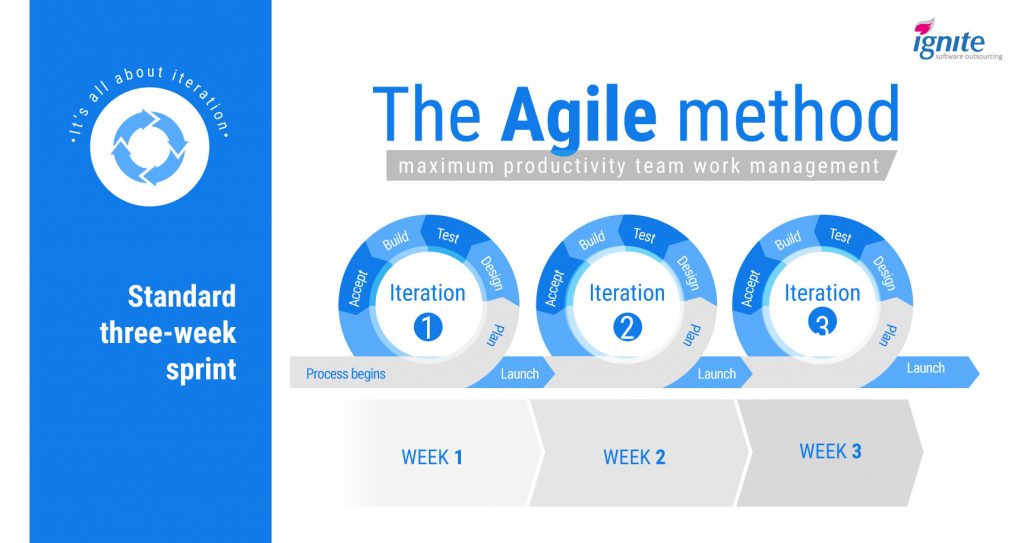
Basically, it’s about iteration. Instead of scoping out a project and then hunkering down until it’s complete, an Agile team will continuously deliver small chunks over set time intervals, called sprints.
At Ignite, we’ve found that three-week sprints work well, and that’s our standard operating procedure.
How to Manage an Offshore Team - the Agile method
The result is that managers can keep a tight focus on how a project is evolving, and catch problems early, before they cause lasting damage.
This is perfect for managing offshore developers, since it requires tight communication throughout the entire process.
In other words, there won’t be an opportunity for your office to fall out of touch with the remote team, and that means the communication issues won’t develop in the first place.

Emphasize Video

There’s a hierarchy to Internet communications.
At the bottom is text. That can take the form of text messages, online chat, or emails. Misunderstandings are common, and that holds true for offshore teams as well. It’s best used for quick updates, nothing more.
Audio is better for engagement, but it’s still not ideal. Phone calls are never going away, but it’s been found that 70% of communication is nonverbal.
That’s why for crucial meetings and status calls, of which you should have plenty with your offshore team, video is king.
There’s no replacing face-to-face communication, and when your workers are spread across the globe, video calls are the closest you can get.
Skype is still the most popular software for video conferencing, though it has plenty of competition these days.
Even with modern video conferencing, it’s still a good idea to meet with your remote workers in person regularly. Let’s get into that now.

Visiting Offshore Team

A good offshore development team represents an ongoing relationship.
Although it’s technically possible to outsource a single project and then be done, this is a mistake.
The real value in an offshore development team is in making them an integral part of your company, so they can learn the ins and outs of the business and gain a true understanding of your strategic goals.
To foster this, it’s important to make an appearance at the remote office, in person, about once a year.
Here’s what you should do while you’re there.
The reverse also works; you might want to invite some portion of the remote team to come work at your local office for a few days.

Use Teambuilding

Think of these visits primarily as a teambuilding exercise.
Although it’s a good opportunity to work through operational challenges as well, you’ll find that the real value here is in getting to know the remote workers, letting them get to know you, and making them feel like a valued part of your business.
You’ll be rewarded with vastly increased engagement, and workers who actually understand and care about what they’re doing for you.
Use this time to get to know the remote workers, listen to the challenges they face, and brainstorm ways to integrate them more tightly into your operations.

Listen

Remember that this visit is likely the only time the entire remote team will have access to you.
A well-organized outsourcing operation will utilize a project manager as the single point of contact, except for when you’re physically present.
Consider taking a tour of the office, hosting the workers for a meal, or even an overnight stay. In this more informal setting, take the time to listen to the challenges they face, their ideas for solving them, and brainstorm ways to more tightly integrate the remote team into your operations.
In addition to fostering engagement, you might be surprised at the solutions and new ideas that can develop during this process.

Invite Them Back

All of this applies in reverse, too.
That is, you should consider inviting some of your offshore workers to come visit your local office. This is a great opportunity for your employees to get to know the remote team in an informal setting.
You’re likely to find that the two sets of workers collaborate much more effectively after spending some time in the same room.
Of course, the real point of all this is to ensure a successful development cycle.
So, let’s get into some tips directly related to project management itself.

Project Management Tips for Offshore Teams

Managing a development project with remote workers involves many of the same principles as a local team.
As you’ve learned, the best firms use the Agile methodology, and you’ll find that the basics of day-to-day operations are much the same as a local office.
However, there are some key differences, mostly relating to the different mode of communication you’ll take with a remote team.
Despite all the collaboration and video conferencing software available today, communication will never be quite as easy with a geographically disparate team as it is in a local office.
Here are a few ways to overcome that truth.

Spec the Project from Start to Finish

Most of what you do in managing remote workers is geared towards enhancing communication. The more efficiently your local and offshore teams can exchange ideas, the better off you’ll be.
It’s important to minimize the “black box” effect as much as possible. You need to be involved in project from start to finish, without feeling like you’ve simply turned on an app-creating machine and stepped back.
However, the fact is that for large chunks of a project, the more distant workers will be operating just like that. A good development house will engage in as much planning as necessary.
But at some point, they have to get to work, executing the plan you’ve constructed. They’re in another country, in another time zone, and it’s just not possible to watch them every step of the way.
For that reason, it’s vital for both parties to be clear on every step of the task. If you have any opinion at all on how a piece of the project should be built, build that into the spec.
Don’t leave things vague, expecting the remote team to check in with you for clarification. Sometimes, that’s just not feasible for them, and they’ll need to take an educated guess.
To eliminate that possibility, be as thorough as you possibly can. Spec out every aspect of the project, even more so than you would with a developer working at your location.

Set SMART Goals

Basically, SMART is a method for creating concrete, measurable goals for yourself or your workers.
SMART goals leave no room for confusion or misunderstanding. They have a clear goal, a time limit, and there can be no doubt about whether or not they’ve been achieved.
This is a valuable technique for offshore developers. By leaving no wiggle room when defining success, you allow remote workers to make progress without wondering if they’re going in the right direction.
We detailed SMART goals in our in-depth guide to Best Practices for Offshore Development, which you should absolutely read if you haven’t already.

Practice Data Security

Finally, before committing to a remote office, you should make sure your data security is up to snuff.
A recent PricewaterhouseCoopers study found that data breaches are a growing concern with overseas companies. In particular, an astounding 85% of surveyed Indian outsourcing companies reported at least one data breach in 2015.
This entails locking down vulnerabilities both within and outside the offshore office.
Contracts and legal agreements need to be airtight. Physical and network security need to be emphasized as well, and this can be challenging when dealing with a remote office.

Conclusion

Learning how to manage an offshore development team is challenging, but ultimately rewarding.
There’s a shift in perspective compared to working with local developers, but it’s critical to long-term success.
Do you research and take the time not just to lay a strong foundation, but to manage the team well over time.
To summarize:
  • Set the stage for success with effective communication and goal-setting.
  • Keep the remote team engaged and invested by valuing them like your own employees.
  • Be detailed and thorough when specifying projects and setting objectives.
Do all this, and you’ll see vastly improved productivity and innovation, and a significant cost savings.
It’s well worth it.

Friday, March 27, 2020

OFFSHORE SOFTWARE DEVELOPMENT | EMERGING TRENDS


Due to the increased demand for software development, IT companies now prefer to give software development project to other Software Development Company UK and around the world and we call this phenomenon Offshore Software Development.

THE IDEA BEHIND OFFSHORE SOFTWARE DEVELOPMENT:

The offshore services first began in the late 90s and today thousands of companies prefer offshore software development services. The reason is that you can give your software development project to top reputed companies around the globe.
Yes, there is no need to put the extra money to train your in-house employees while you can give your whole project to an offshore software development company.
If you are familiar with the concept of outsourcing software development, then it will be easy for you to understand the idea behind offshore software development. The offshore software development is the outsourcing of software development services from a third-party entity which is situated in a remote location off the shores of the first party’s residence.

WHY YOU SHOULD CHOOSE OFFSHORE SOFTWARE DEVELOPMENT?

As we are living in a competitive age, companies who are not preferring outsourcing are at a great loss. The reason why you should choose offshore software development services is based on its following advantages:
Increased Focus: The offshore software development let you focus on the core values which means that it allows you to outsource the less important modules of your project to a third-party developer. By this, you can focus more on the core values and the functions of the software.
Fast Delivery Speed: When you give your software development project to an experienced IT company, it becomes the responsibility of the company to provide you the product within a given time. Outsourcing the services of software development companies ensures that your project will be completed on time without compromising its quality. This is because the professional IT companies have enough experience in the software development field which makes their developers consume less time on software development.

EASY SCALABILITY:

The outsourcing of software development allows you to scale up and down according to the client’s demand. If you are planning to develop your required software in-house, let me tell you that it will cost you time, energy, and money. You have to train your employees or spend extra money on the recruitment of developers which might not be ideal for a one-time project. With offshore software development, you can hire experienced developers suitable for your software development project.

COST REDUCTION:

With offshore software development, you do not need to spend money on tools, supplies, and other resources to develop software. You do not have to hire a whole team of developers for a one-time project. Offshore software development let you choose the best developers around the globe within a suitable cost.

SAVES TIME:

As mentioned above, for In-House Software Development you need resources which may cost you a lot. Hiring developers for a one-time project is also not a good option. Therefore, offshore software development is preferred by companies as it reduces the cost of software development projects.

NO TRAINING REQUIRED:

If you outsource software development services, there is no need to train your own employees for that. Your whole team can focus on the main goal of the business while the development company will take care of the development process.

REDUCED RISKS:

The thing which you should always keep in mind that you must choose the software development services that matches your project requirement. Choosing the right software developer for your project reduces the risk of errors in software development.
Due to all these benefits, organizations seek to get offshore software development services, especially in the field of IT.

EMERGING TRENDS OF OFFSHORE SOFTWARE DEVELOPMENT:

According to the report of Statista, the offshoring and outsourcing market in 2007 reached USD 88.9 billion globally. With this elevated business in the IT industry, the outsourcing of software development is expected to rise more in the future.
As more and more companies are getting benefits outsourcing services the following are some emerging offshore software development trends to look in the present year of 2019.
  • New Offshore Locations
  • Enhanced Data Security
  • Cloud-Computing Technology
  • Excessive Use of Collaborative Tools
  • Increasing Demand for Cutting-Edge Skills
  • Block Chain Technology
There are countless reasons why you should shift to outsourcing including low labor and operational costs. Due to the increased demand for outsourcing software development, here are the details of top emerging trends of offshoring software development in 2019 you should know.

NEW OFFSHORE LOCATIONS:

The trend of getting offshore software development services is spreading like a fire. According to market studies, around 80% of the world’s largest companies are getting offshore software development services. As the demand for outsourcing increases, more and more tasks will be done by preferring offshore services. Today, Latin America and Asia are known to be the best offshore service providers. Moreover, the Philippines is expected to turn into famous offshoring choice due to low labor cost. It is already popular for its BPO services.
The recruitment of offshore development teams helps foreign organizations to jump-start their business. The Asian countries such as India is a prime destination for recruiting offshore software development due to the price flexibility, exceptional quality of services, and technological availability. So, if you are seeking best and professional offshore software development services the Asian countries would be a better choice for you.

ENHANCED DATA SECURITY:

The main concern of a businessman is the security of the business data. When recruiting an offshore developer, people might think about whether their company’s data is secured or not. Well, it is not bad to worry about your data security. Many organizations believe that outsourcing is an open gate to security threats and data theft as data security is not guaranteed. Poor data security can lead to the loss of leakage of trade secrets. Obviously, data security cannot be compromised. Therefore, the World Wide Web has intensified the security risks for businesses either it is getting in-house or offshore services.
The security issues can be resolved by emphasizing the need for data integrity certifications. With the increased demand for offshore software development services, security solutions are evolving to address the client’s concerns.

CLOUD-COMPUTING TECHNOLOGY:

We all are familiar with the concept of Cloud Computing as there has been around two decades since it was introduced to the world. Anyhow, in recent years cloud-computing is much popular.
According to the study conducted by the International Data Group (IDG), 69% of businesses use cloud-computing technology. Moreover, 18% of businesses are planning to implement cloud-computing technology solutions to enhance service quality. It is observed that companies that invest in cloud-technology enjoy 53% faster revenue growth as compared with other competitors.
Cloud computing guarantees a dynamic and significant increase in the overall profit of your business. Moreover, it also ensures customer satisfaction. The incorporation of cloud computing makes business reliable with most services sustaining an uptime of 99.9% on average. Because of this, all the services of your business become available 24/7. Moreover, cloud-based applications can be launched anywhere in the world at any point at any time.
Another amazing feature of cloud technology is that it offers flexible facilities which can be molded according to the requirements of the user. This means that the capacity of cloud-based services can be twisted depending on the needs of the user, which leads to the reduction of costs for the business.
Another amazing advantage of cloud computing is that it includes automated updates, enhances collaboration and security. It is estimated that cloud computing will rule over the technology world in the coming years and will become one of the dominant trends in outsourcing services. This is the reason offshore service providers are focusing on increasing productivity using cloud technologies.

EXCESSIVE USE OF COLLABORATIVE TOOLS:

The purpose of introducing collaborative tools is to help multiple people to support each other for the accomplishment of a common objective. As offshoring services are common these days, collaborative tools are excessively being used by onshore and offshore teams. These tools act as a bridge between the in-house team and offshore team and create better understandings among them. By observing the needs of today’s working environment, app developers are focusing more on developing collaborating and communication tools.
The growing trend of the usage of collaborative tools ensures businessmen that they can easily get offshore services without any disturbance. The reason is that collaborative tools lower the risk of miscommunication, manages time, and reduce cost.
The following are some collaborative tools that will be used at a large scale to build a strong offshore team:
Trello: This is a collaborative project management and storage tool. It possesses an intuitive user interface which helps team members to collaborate team members with different tasks such as the organization of attachments, conversations, and to-do lists.
JIRA: It is a software solution for offshore software development teams. JIRA helps team members to customize and modify track bugs, scrum boards, etc. It also helps to check the status of the project.
Yammer: It is an enterprise social network. Yammer mimics the collaborative environment but it is not like Facebook and Twitter etc. Basically, Yammer is a platform where team members can upload files, micro-blogs, etc. It helps team members to follow-up on discussion with other team members. In general, Yammer connects offshore and onshore team members around the globe.

INCREASING DEMAND FOR CUTTING-EDGE SKILLS:

The fast evolution in technology from Artificial Intelligence. to Block Chain and Cryptocurrency creates the need for a business to resources with cutting-edge skills to stay competitive. The demand for skilled IT workers is increasing exponentially turning companies to get offshore software development services. However, while hiring the software developers the main thing which the company considers is the soft skills and hard skills including teamwork, communication skills, leadership skills, etc.
According to studies, every third organization is looking for offshore software development services in the area of Artificial Intelligence, Machine Learning, and Cybersecurity. The outsourcing services are accelerating to facilitate global technical transformation. Due to which developers must have cutting-edge soft and hard skills to meet the competitive criteria of this digital world.

BLOCK CHAIN TECHNOLOGY:

The blockchain technology hit the road of the digital world in 2017. This trend gained popularity in Healthcare Organizations, Telecommunications Industry, Media Houses, and many others. Almost every industry is looking forward to investing in blockchain technology to enhance its business models. Along with the financial industry, the IT industry is also taking advantages of this technology. The benefits of blockchain technology include reduced costs and complexity, increased flexibility, fast speed of digital transactions and reduces the probability of data duplication.
As there is an increased call of blockchain technology among many organizations, the developers with expertise in it are going to be in high demand too. With the increased demand for Blockchain Developers, outsourcing is done by the majority of companies to find the best developer around the globe.

THE STRATEGIES BEHIND OFFSHORING SERVICES:

There is a huge number of companies which are getting offshoring software development services. The executives are developing strategies to aid outsourcing. The following are some outsourcing strategies that help the businesses to achieve maximum return on investment.
  • Share the Big Picture
  • Create a Culture of Belonging
  • Respect Offshore Team Expertise
  • Communication
  • Establishment of Consistent Process
It is obvious that strategies drive the tasks. For a better understanding of offshore software development services, let’s have a look at the details of strategies behind these services.

SHARE THE BIG PICTURE:

Most of the businesses take offshore services as execution partners for temporary projects, systems or functions. This gives the offshore service providers a vague image about the goals and objectives of the client’s company. To avoid this, the company must clearly communicate about their vision with offshore service providers so that the Offshore Software Development Team feel invested in the process of developing a product. The benefit of this strategy is that this will make offshore team members focus on the client’s goals and objectives.

CREATE A CULTURE OF BELONGING:

The main problem in Offshore Software Development is miscommunication. The companies should create a culture of belonging between offshore and onshore team members so that they can work on the same goal. The client should promote a healthy engagement between onshore and offshore teams. This will result in a unified sense of belonging across time zones, borders, and hierarchies. The companies should make every team member, both onshore and offshore, feel included and appreciated so that all the team members work with their full concentration without any disruption.

RESPECT OFFSHORE TEAM EXPERTISE:

With the advancement of technology, there is a huge demand for skilled cutting-edge developers. This increased demand makes the Offshore Developers create new innovative ways to tackle a roadblock in the software development process. Some clients practice very active approach with their offshore resources which does not always give good results. Anyhow, it is significant that businesses use diverse skillset of their recruited team members. The professional approach of employees can help the business go the extra mile.

COMMUNICATION:

Whether working offshore or onshore, communication is the key to success. Many projects and companies go down just because of miscommunication. Working with an offshore team requires a lot of attention and communication because you have to deal with two different time zones. Your offshore team is a virtual team which requires effective communication. The best thing to deal with both onshore and offshore teams is to create a bridge between them. This can be done by creating an environment for communication where both onshore and offshore team members can collaborate effectively.
The collaborative tools have made communication between offshore and onshore team members too easy.  Both teams can simply schedule the meetings, make notes, and communicate with each other using these collaborative tools. The use of collaborative tools reduces the friction between two teams and aid in the planning and success of the project.

ESTABLISHMENT OF CONSISTENT PROCESS:

The most common problem faced by many companies with offshoring is the risk of inconsistent process deliverable's. The software development process is implemented differently by different developers. Although the main stages of the software development process such as requirement gathering, coding, testing, etc. remain the same. The software development process gets interrupted due to the lack of these standard practices. Both the offshore and onshore team members should have a clear vision when developing software so that any hurdle in the process can be detected at the beginning of the process. The client should provide clear requirements to the offshore developers so that the risk of inconsistency can be reduced.
Offshoring Software Development Services is quite a challenging task. Because your service providers are virtual, you cannot compromise the communication. Bridging the time zones and geographical locations is the key to outsourcing any service. Offshoring services are being taken by many countries including America and Europe. The companies around the globe want to recruit the best people for a job regardless of their geographical location.
Getting up to date with evolving technological trend and provide the best services is the goal of every company. Does your company follow these trends? Do you think your business needs offshoring software development services? Or if you already getting these services do you think there is another way to make it in a better way?

Friday, March 20, 2020

The Cross Platform Mobile App Development: A Definitive Guide


When most people think about building a mobile app, their minds go straight to native development. Native apps are built specifically for certain platforms, like iOS or Android.
Don’t get me wrong; I won’t sit here and say that there aren’t advantages to taking the native route. But with that said, native development will likely be your most expensive path.
On the other hand, cross-platform development is rising in popularity.
In fact, the cross-platform app development market surpassed $7.5 billion at the end of 2018.
This development method allows you to develop an app for Android, iOS, and Windows simultaneously. But can these apps be as good as native apps?
Honestly, if you use the right tools and resources, users won’t be able to tell the difference.
But where do you begin? What tools do you use for cross-platform development?
These are common questions that I hear on a regular basis. That was my inspiration for creating this guide.
I’ve created the ultimate resource of development tools, programming languages, and tutorials for cross-platform development. This will put you in a position to build a mobile app that’s ad no disadvantage compared to traditional native apps.
Plus, you’ll have the benefit of reaching users across different platforms with just one app.
Cross-platform development is the way of the future. I highly recommend using this guide as a reference and learning tool.

The Best Cross Platform Development Tools

First things first; If you’re going to build a cross-platform app, you need to pick a development tool. I’ve narrowed down the top options to consider based on ease of use and outstanding performance.
These are the most popular choices in terms of quality. So check them out and decide which one is best for your specific needs.

Appcelerator

appcelerator
Appcelerator is a development platform focused on enterprise solutions. The tool helps get apps to market faster by simplifying the cross-platform development process.
Developers can use a single JavaScript code base for native apps and cloud-based mobile apps as well. This code can be used for apps on any device or operating system.
Another top benefit of Appcelerator is their quality assurance. They make it easy for you to verify your apps using automated mobile tests. You’ll also be able to measure usage and results of your projects to detect bugs, crashes, and make adjustments to improve the performance.
The API builder allows you to mobilize all of your data in just minutes. This makes it easier for you to scale.
All Appcelerator developers will have access to Hyperloop for free. This is one of the strongest and most robust cross-platform APIs on the market.

PhoneGap

phonegap
PhoneGap is owned by Adobe—a company with a reputation that speaks for itself. This is definitely one of the most popular cross-platform development options within the developer community.
It’s based on the open source Apache Cordova. This open source framework gives you access to the PhoneGap toolset, which makes it possible for you to get to market faster.
One of the reasons why I like PhoneGap is because you have access to guides that are specifically for their platform. Anyone can learn how to use their tools, even if you don’t have experience with them.
For those of you who already have web development skills, there won’t be much of a learning curve when it comes to making hybrid apps. PhoneGap uses JavaScript, HTML, and CSS to build cross-platform apps using a single code base.
Once you’re done building, you don’t need to maintain native SDKs. The PhoneGap build service takes care of all of this for you by compiling your work in the cloud.

Xamarin

xamarin
Xamarin is a product from Microsoft Visual Studio. It allows you to build apps for iOS, Android, and Windows using a single .net code.
All apps built with Xamarin look and feel like they are native apps. That’s because Xamarin uses native interfaces that behave the way a user would expect them to.
If you use Xamarin, your app will have platform-specific hardware boosts that are compiled to achieve native performance. This isn’t the case with alternative solutions that need to interpret code at runtime.
More than 75% of your code will be the same, regardless of the platform you’re building for. Xamarin identifies the similar code and accelerates the process for cross-platform development.
You can access their IDEs on whichever platform you prefer. The visual studio is available for both Mac and PC. Both systems come with publishing tools, debugging, UI design, and code editing.

Redhat

redhat
Formerly known as FreedHenry, Redhat is a global resource of open source solutions. They offer specific services for cross-platform development and mobile backend.
This lets enterprises develop and launch mobile apps for Android, iOS, and Windows simultaneously via the cloud.
Here are some of Redhat’s tools that are specific to app development:
  • OpenShift application runtimes
  • OpenShift application container platform
  • Developer studio
  • Decision manager
  • Data grid
  • Process automation manager
  • JBoss enterprise application platform
  • JBoss web server
As you can see, they have a wide variety of tools that will help you with your cross-platform development needs.

Alpha Software

alpha software
Alpha Software is a solution for enterprises. The main purpose of this software is to build business apps that are intended for employee usage.
If your company doesn’t issue smartphones to your employees, then it’s a safe assumption that everyone will be using different platforms. That’s why you need to use a cross-platform development tool to build your app.
Some common features built with Alpha Software include:
  • Event reports
  • Work orders
  • Field research
  • Signature capture
  • Medical forms
  • Safety checklists
  • Equipment inspections
  • Service dispatch
These types of functions are versatile enough to accommodate enterprises in any industry. Alpha Software offers a 30-day free trial. So at the very least, it’s worth trying out.

Sencha Ext JS

sencha
With Sencha Ext JS, you can build cross-platform web applications for smartphones, tablets, and desktops. This is a top option for those of you who need to build an app that’s data-intensive.
The framework uses HTML5 functionality for modern browsers. All of the UI components have been previously integrated and tested for optimal performance.
Some of the available components include grids, forms, menus, panels, toolbars, trees, and lists. There are also hundreds of extensions available for complete customization when you’re building.
Sencha offers a sophisticated data visualization table, making it easier for you to track extensive information. The Ext JS data package is robust and highly functional with a flexible layout manager. This makes it possible for you to organize how your content is displayed based on device, screen size, and browser.
Sencha also has an accessibility package that’s Section 508 compliant, which is a huge benefit it, considering the fact that app accessibility is the new must in mobile development.

Kony Quantum

kony
Kony Quantum is an easier way to build mobile apps for multiple platforms. That’s because they have a visual canvas with pre-built components for you to choose from.
You can use Kony to create new apps or improve existing apps as well.
This tool is great for inexperienced developers. They provide guided tours and single-click cloud builds throughout the process. It’s easy to integrate data, which will eventually be put on a visual data map to enhance productivity.
The end result of your cross-platform development project will be modern, beautiful, and entice an engaging experience for the user.

Alternative Cross Platform Editors and IDEs

For those of you who want to create a basic mobile app or need something that’s more niche-specific, you’ll definitely want to look through these alternative editors and IDEs.
The options below aren’t necessarily as popular as the major cross-platform development tools that we’ve seen so far, but they’re still very helpful and easy to learn.

Mobincube

mobincube
Mobincube is a multi-platform tool used to build native multiplatform apps for Android and iOS. More than 193,000 apps have been published by Mobincube users.
Furthermore, apps created with this tool have resulted in more than 238 million downloads. This has resulted in over $3.2 million in revenue for developers.
It’s free to sign up for Mobincube and it’s very easy to use. If you want additional features like app store optimization, ad removal, and cloud user management, you’ll need to upgrade to one of their premium plans.

IntelliJ IDEA

intellij
IntelliJ IDEA is an open source product from JetBrains. Right out of the box developers will get the tools and version controls they need to support a wide range of frameworks and programming languages, without having to install any plugins.
It’s mainly used with Java development for Android, but with that said, it can also be used for cross-platform development.

Qt

qt
According to their website, Qt claims that eight out of the top ten Fortune 500 companies use their products.
Qt is great for rapid development, deployment, and prototyping. The IDE and UI tools are intended for both developers and designers. The platform is reliable, stable, and yields high-performing results.
Their cross-platform development framework makes it possible for businesses to use a single codebase with common APIs to support all mobile platforms.

Cocos2D

cocos
Cocos2D is made for those of you who want to build a cross-platform gaming app. It comes with a package of development tools, specifically for gaming.
The Cocos Creator also comes with tools for game previewing, a game engine, scene editing, publishing, and game debugging. All of these make it possible for you to deploy your mobile game across multiple platforms.

Corona

corona
Corona is another cross-platform framework that’s used for creating gaming apps for both mobile devices and desktop systems. Once you publish your app, it can be accessed across multiple devices, such as:
  • iPhone
  • iPad
  • Android phones
  • Android tablets
  • Amazon Fire
  • Windows desktop
  • Mac desktop
  • Apple TV
  • Android TV
  • Fire TV
Corona uses Lua, which is an open source programming language. It’s fast, lightweight, and powerful. Some of the world’s most popular games like Angry Birds and Warcraft use Lua.
This is a free cross-platform resource. Everything you build can be deployed on all devices with just one code base.

Ionic

ionic
Millions of developers have used Ionic to build their apps. The JavaScript framework supports cross-platform development. Their open source UI toolkit can be used to develop native Android, iOS, and web applications using a single code base.
Ionic also has tons of guides and resources to help you get through the building process. The newest version of this editor claims to be smaller, faster, and more extensible than ever before.
You’ll need to install Ionic Studio locally onto your device. But the visual editor makes it easy for you to build apps fast.

Yapp

yapp
Yapp is used for making a very specific type of application. You can use this platform to create cross-platform apps for conferences, events, and meetings.
It’s essentially a way for companies to run an event by going paperless. This improves the accuracy of information given to attendees and guests whenever you need to make last minute changes. You can create and send push notifications to guests with reminders about the schedule as well.
So for those of you who are looking to build an app to manage your events, I’d definitely recommend using Yapp.

RubyMotion

rubymotion
As the name implies, RubyMotion is made for writing cross-platform native apps with the Ruby programming language. With RubyMotion, all of the applications are built using the terminal command line. So you’ll be able to use your favorite editor, as opposed to learning how to use a new one.
Once your code gets written in the interactive console, the real-time changes will be integrated to third-party libraries. From there, RubyMotion has a built-in debugger to help you identify any problems. There is an automated testing framework integrated into this platform as well.

Dropsource

dropsource
Compared to some of the other editors and IDEs on our list, Dropsource is a fairly newer alternative. It’s a browser-based platform, so you don’t need to install anything on your machine.
You can build cross-platform native apps using Swift and Java. Just because it’s a browser-based editor, it doesn’t mean you lose mobile functionality. You can still add elements like geolocation, face ID, touch ID, push notifications, and video recording to your app.
Dropsource has a visual editor and REST API, which is ideal for seamless data integrations. It’s easy to update your app with their drag and drop process.

AppsMoment

appsmoment
AppsMoment has been on the market for six years. During that time their platform has been used to help more than 60,000 people publish over 700,000 apps.
No coding is required to build these cross-platform mobile apps. They have over 500 app templates and 120 features for you to speed up the building process.

Xojo

xojo
At a minimum, the majority of the cross-platform tools we’ve seen so far have the ability to build apps for mobile, web, and desktop. Xojo stands out from the crowd because it’s compatible with all of these but also lets you develop with Raspberry Pi.
It’s easy for developers to build a native interface quickly with the drag and drop UI. This makes Xojo a top option for beginners.
I’d also recommend their community forums, which can be a useful resource to get help and clarification whenever you’re stuck. Xojo also has tons of tutorials, video demonstrations, textbooks, and example projects to ease the learning curve.

Progress Kinvey

progress
Progress Kinvey is made for web developers who already have JavaScript skills. With prior JS knowledge, you can easily build cross-platform native apps for Android and iOS.
The web-based development studio is made to enhance productivity. As a developer, you can focus on the business side and user experience of your app, while the platform automatically adjusts to scale accordingly.

Mag+

mag
Mag+ has digital publishing software intended for building mobile business apps across multiple platforms. Their SDK simplifies the process for publishing content to your app.
You can design, build, distribute, and publish your app all with the help of Mag+ tools.
It’s not as popular as some of the other tools on our list. Less than 5,000 apps have been built with their platform. But with that said, big names like Volvo, United Airlines, and the Harvard Business School have created apps with Mag+.
I’d recommend it for things like internal newsletter applications, sales presentations, branded magazines, and product catalogs.

Programming Languages

The majority of cross-platform editors and IDEs all operate under the same premise. Developers use one code base to build their app.
If you know more languages for the coding environments, you’ll have more options when it comes to choosing the best tool for building your cross-platform app.
Not every programming language is the same. Some are new, some are old, and others are more known for native development on specific platforms. Either way, I’ve narrowed down the top cross-platform development languages for you to consider for your project.

JavaScript

JavaScript is one of the core elements of the Internet. It’s essential for web applications and interactive web pages. Most major websites use JavaScript, and web browsers typically have dedicated JS engines to execute its functionality.
This is probably one of the best programming languages for beginners who are new to coding. For those of you who have a background in web development, it will be easier to build a cross-platform mobile app using JS.

Java

Java is another top choice for cross-platform development. There aren’t many downsides to using this programming language to build any type of app since it’s compatible nearly anywhere.
Java is known for keeping costs low, driving innovation, and improving app services. It’s the go-to language for cloud computing and enterprise architecture.

Ruby

Ruby is a newer programming language that’s open source. It’s meant to be as simple and lightweight as possible. Unlike some of the other languages, Ruby was designed specifically for mobile applications.
People like Ruby because the syntax is easy to write and reads naturally.

C++

As a general-purpose programming language, C++ is seemingly everywhere. It runs on platforms like Mac, Windows, Unix, and Linux.
It probably shouldn’t be your first choice for cross-platform mobile apps, since it can add some strain to mobile resources.

C#

C# is becoming one of the most popular languages for cross-platform web applications. What Objective-C is for Mac, C# is for Microsoft.
If you’re familiar with Java, C++, or C, then it will be easy for you to recognize and pick up C#. This object-oriented language can be learned fairly quickly.

HTML5

HTML5 is at its strongest when paired with JavaScript. It’s the fifth version of the HTML standard, used to define behaviors and properties of content on web pages.
This programming language will help make your app compatible with desktops.

Cross Platform Language Tutorials

Now that we’ve identified the cross-platform programming languages, you need to learn how to use them. I’ll show you the top tutorials for each language that we covered above.

JavaScript language tutorials

If you want to learn JavaScript, look no farther than these three tutorials.

Mozilla Developer Network

mozilla
The Mozilla Developer Network is a top resource for building cross-platform apps. In addition to JavaScript, MDN teaches you the basics of HTML and CSS. Without this foundation, it will be challenging for you to learn JS.
MDN has modules for JavaScript first steps, building blocks, objects, and client-side APIs. You’ll also have access to some of the most common problems and solutions with this language.

/r/LearnJavaScript

reddit
Most people wouldn’t think to turn to Reddit to learn a programming language. But this discussion thread is updated on a regular basis. It’s a great resource for asking questions amongst your peers.
More than 56,000 people are part of the r/learnjavascript community. Moderators and active members are constantly posting content to keep the thread alive. I’d recommend joining this Reddit community.

Eloquent JavaScript

eloquent
Marijn Haverbeke wrote the third edition of Eloquent JavaScript as a modern introduction to programming. The book has 21 chapters broken down into three different parts:
  1. Language
  2. Browser
  3. Node
You can access a digital copy of the book by clicking the link above. There are some great illustrations in addition to the informative text written by Haverbeke.

Java language tutorials

There are tons of Java tutorials on the web. But you really only need to consider these three options below to teach you how to write in Java.

Freeware Java

Freeware Java is basically a list of Java resources for various projects. The tutorials include:
  • Special effects and game development
  • Code signing
  • Java 2D
  • Developing an arcade game
  • Java lecture notes
  • Java for students
So check out this language tutorial if you have some specific needs that you’re looking for help with.

The Java Tutorials

java
If you want to learn how to use Java, sometimes your best bet is to go straight to the source. The Java Tutorials are available from Oracle, the original developer of the Java language.
Here you’ll be able to find information on the basics like date-time APIs and deployment. They also have tutorials on graphical user interfaces, as well as specialized lessons for things like custom networking, generics, internationalization, and sockets direct protocol.

Tutorialspoint

tutorialspoint
Tutorialspoint has an extensive list of Java video tutorials. There are basic videos covering things like environment setups, syntax, variable types, loop controls, and decision making.
You’ll also have access to specific object-oriented tutorials for:
  • Interfaces
  • Packages
  • Overriding
  • Abstraction
  • Inheritance
  • Encapsulation
  • Polymorphism
Tutorialspoint offers videos for advanced Java components like multithreading, serialization, collections, and data structures.

Ruby language tutorials

As I said before, Ruby has a reputation for being easy to write and read. It’s not as popular as some of the other languages, but its usage is increasing for mobile apps.

The Well-Grounded Rubyist

The Well-Grounded Rubyist is a book that was written by David A. Black in 2014. This 536-page tutorial covers topics for Ruby beginners as well as programmers who have in-depth experience using this language.
There are three different sections to the book, each with extensive explanations and applications:
  • Part 1 — Ruby foundations
  • Part 2 — Built-in classes and modules
  • Part 3 — Ruby Dynamics
It’s available as a physical book as well as a digital copy, so get whichever version you prefer.

Ruby Koans

ruby
Ruby Koans is a hands-on tutorial on the Ruby language. The course takes you through different problems that you need to solve on your own. This is one of the best ways to learn a new skill.
It’s compatible with most editors, but there are some suggested options that that will give you the best experience. For example, if you’re using Windows, you should use the E Text Editor, RubyMine, or jEdit to get the most out of the Ruby Koans tutorials.

Pragmatic Studio

pragmatic
The Pragmatic Studio offers free tutorials, video courses, and books to teach a wide range of developer skills. You can find plenty of great resources for Ruby here as well.
There are more than 25 videos on basic Ruby programming, totaling more than 5 hours of content. The pragmatic studio has more in-depth video tutorials on mastering Ruby blocks and Ruby on Rails. If you include the accelerated content, there are roughly 100 videos and nearly 20 hours worth of Ruby tutorials.
You’ll likely want to upgrade to the premium content. The free courses are useful, but they are limited.

C++ language tutorials

Learning C++ may not be your first priority for cross-platform mobile app development. But when you’re ready to take the plunge, look no further than the two language tutorials below.

Engineer4Free

engineer4free
As you might have guessed, Engineer4Free will teach you C++ at no cost. It’s a top choice for learning C++, even if you don’t have any prior experience with this language.
For those of you who have some basic knowledge and foundation for C++, the course also has advanced lessons for functions, vectors, loops, and more. Overall, there are 47 C++ tutorials offered by Engineer4Free.

C# language tutorials

Learning C# will help you tremendously as a programmer and developer. These are my top two favorite tutorials for C#.

C# Fundamentals for Absolute Beginners

C# Fundamentals for Absolute Beginners is an older resource on the C# programming language. Most of the content hasn’t been updated in years, but it’s still relevant and able to teach you C# from scratch.
Even if you’ve never coded before in your lifetime, these video tutorials will walk you through the process of everything you need to know as a C# beginner.

HTML5 language tutorials

Having a basic knowledge of HTML5 will help you tremendously with your cross-platform development projects.

The New Boston

new boston
Over 2.2 million people have subscribed to The New Boston YouTube channel. They have uploaded more than 4,200 video tutorials related to web design, programming, game development, and graphic design.
They have a 53-video playlist on HTML5. I highly recommend these for beginners and experienced developers alike. The videos are quick and informative, with the majority falling somewhere in the 5-10 minute range.

Codecademy

codecademy
You could argue that Codecademy is the best online resource for learning to code online. They’ve been operating for more than seven years. During that time, over 45 million people have used this resource to learn coding.
Codecademy has a wide range of development and programming tutorials. Teaching HTML5 is definitely one of their specialties.

HTML-5-Tutorial

html5
The HTML-5-Tutorial resource was developed for beginners. It’s definitely not the flashiest or most professional website you’ll find online. But with that said, you’ll still have access to tons of great content that will teach you the basics of HTML-5 in plain English.

Conclusion

Your mobile app needs to be available on as many platforms as possible. But building separate apps for each platform can be an expensive and time-consuming path.
That’s why you need to take advantage of as many cross-platform development tools as possible.
Find a tool that you can use to manage all of your development needs. There are certain tools and programming languages that are more specific than others. For example, some editors and IDEs are geared toward enterprises, internal business apps, or gaming apps used by android app development firms like GoodCore. While other tools and languages are general purpose and have a much broader scope.
Regardless of your cross-platform development project, I’d recommend keeping this guide available as a reference.