Showing posts with label web application development. Show all posts

Thursday, April 30, 2020

SAAS Web Application Development Principles To Be Followed In 2020


If you’re reading this article, it probably means that you aren’t satisfied with the progress of your web development project. More often than not, it means something went wrong during the development cycle.
It could have been a problem with delivery, scalability, or cost estimation. Regardless, whether it’s a new build or an implementation of new features, it can quickly become overwhelming.
So what’s a product owner to do?
Those product owners I was consulting with, react in different ways. But most often, they tend to put all other business activities on hold to dive deep into managing the development process.
The process of developing sophisticated web-based software is more like a marathon than a sprint. But we have to keep moving forward. To avoid potential problems, follow the best practices introduced in this guide. The following recommendations are based on The Twelve-Factor App methodology.
The web application development best practices discussed here can be applied to any Software-as-a-Service (SaaS) model. It covers everything from back-end development on a local machine to cloud architecture.
They are also based on the contributions of a broader community of software engineers who boast significant expertise in enterprise web development.

Technology choice: Symfony PHP framework

This journey into web application development best practices can be used as a guide to designing back-end architecture, and more. You can also do this by using any programming language you like.
However, for this post, we will focus on examples that leverage the Symfony PHP framework. It makes perfect sense as this framework is often used to build mid-sized cloud-based SaaS products.
According to the Roadmap, Symfony has continued to evolve since it was first released in 2005. Today, the framework follows PHP Standards Recommendations and boasts SOLID design principles for web development. So software engineers will be able to follow these best practices, seamlessly.

Principle 1: One codebase can accommodate multiple deployments during the web development cycle

If you’re designing a web application and not a distributed software, I strongly recommend sticking to a single codebase. The best way to go about it is to store your code in a Git repository (or any other version controlled solution).

WEB APPLICATION DEVELOPMENT CYCLE FOR THE NEW FEATURES WILL LOOK (MORE OR LESS) LIKE THIS:

  • Software engineers work with the same codebase on their local computers.
  • After each feature is developed, they’ll push the code to a Git repository.
  • The updated codebase is then deployed and tested on a staging server by the Quality Assurance team.
  • The same code is then deployed to production, but only after it’s tested on a staging level to ensure that it works as intended.

Principle 2: Explicitly declare and isolate dependencies for the software

The golden rule is to first make a list of all external libraries and services that have been used. These should be separate from the code and quickly switched on/off or changed as needed. This enables you to do more with minimum influence on the overall code.
To manage libraries, for example, use a Composer. It’s a great way to add and manage libraries demanded by your web application.
The Composer will create a file called composer.lock. Here, you’ll find the same (exact) version of each package downloaded. These are the same packages that ran during the composer installation.
Store composer.lock in your Git repository and exclude the vendor folder from Git. This approach will ensure that each deployment (for another developer, for staging, or production servers) will get the same versions of libraries after the run “composer install” command.
If you fail to do this, you may end up with different package versions on production that will result in unstable app behavior.
Check our case study about moving a Web product from monolith to microservices architecture and reducing dependencies to a minimum.

Principle 3: Separate configuration files and application code base

According to the Twelve-Factor App principles, “an app’s configuration is everything likely to vary between deploys.”
Often, software configuration settings can be changed between development, staging, and production environments. However, according to the application development principals, storing them in the codebase as configs or constants is prohibited.

THE FOLLOWING ARE EXAMPLES OF SETTINGS THAT SHOULDN’T BE STORED WITHIN THE CODE:

  • Database and cache server connection settings
  • Credentials to third-party services
  • APIs and payment gateways
  • Everything that changes depending on the deployment stage
Not following these web development principles may lead to scenarios where your app works perfectly on the developer’s machine and at the QA stage, but not when it’s deployed to production. Typically, something always breaks because of the changes made to the configuration in the code.
However, Symfony web development uses DotEnv library to work with environment variables. Here’s an example of different environment variables for development, staging, and production.
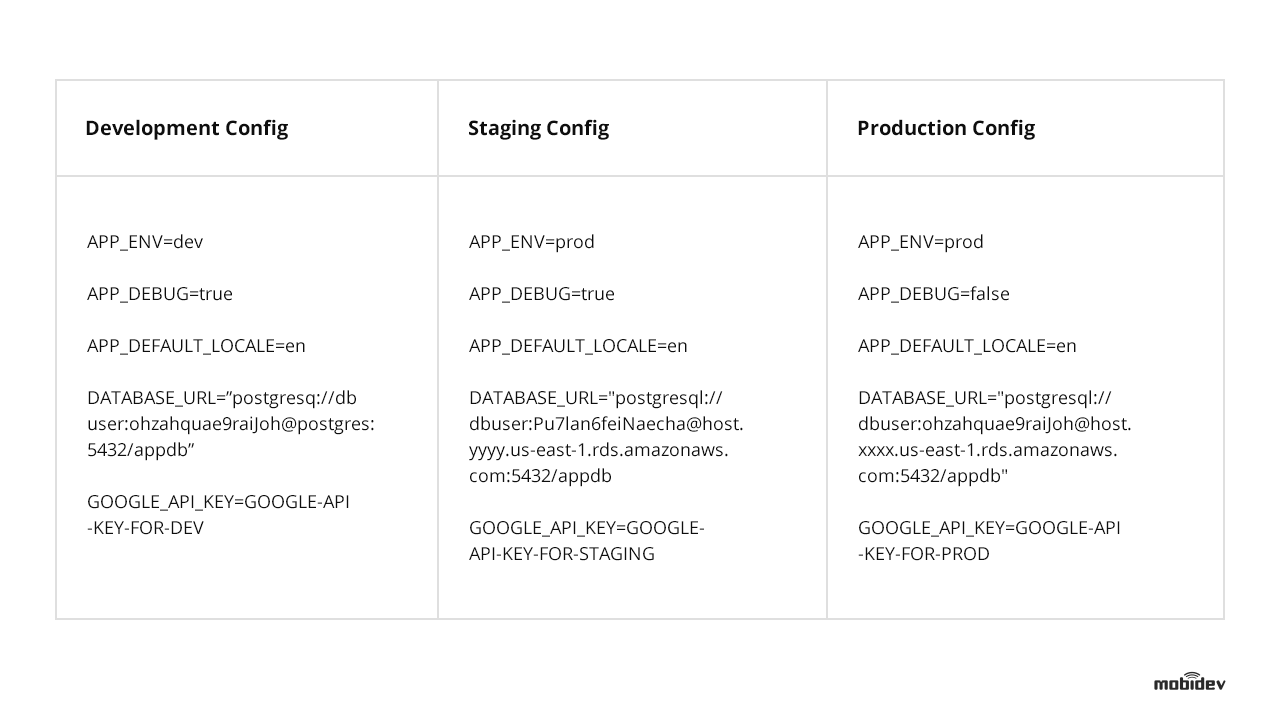
Examples of different environments for web app development
So it doesn’t matter where the web app is deployed because there won’t be any need to change the code. Only proper environment variables have to be set. If you’re using Docker, run different Docker containers from the same image with different environment variables for different deploys.

Principle 4: All the variety of services your web app runs, have to stay detached

The software community verdict is clear. It doesn’t matter if the application uses some third-party back-end services, APIs, or built-in components like a MySQL database. The best practice in this scenario will be to treat them all as attached resources.
Enable software access via a URL or use any of the other methods stored in the configuration. This approach will allow the development team to manage components without making changes to the code.
Symfony development is all about following SOLID principles. For example, to change database storage from MySQL hosted on EC2 instance to Amazon RDS, you just need to change the DSN style URL in the environment configuration without making any changes to the code.
You can even change static storage from Amazon S3 to any other Cloud Storage just by changing the environment variables, without changing the code.
Some libraries support various types of storage with an implemented abstraction layer. Flysystem, for example, supports different types of cloud storage. Doctrine is another example, but it’s abstracted around database storage. So you can switch from MySQL to PostgreSQL after making minor changes to the code.

Principle 5: Build, release, and run each software development stage separately

To ensure stability during all stages of the build, you can leverage automation tools like Gitlab CI and Jenkins.
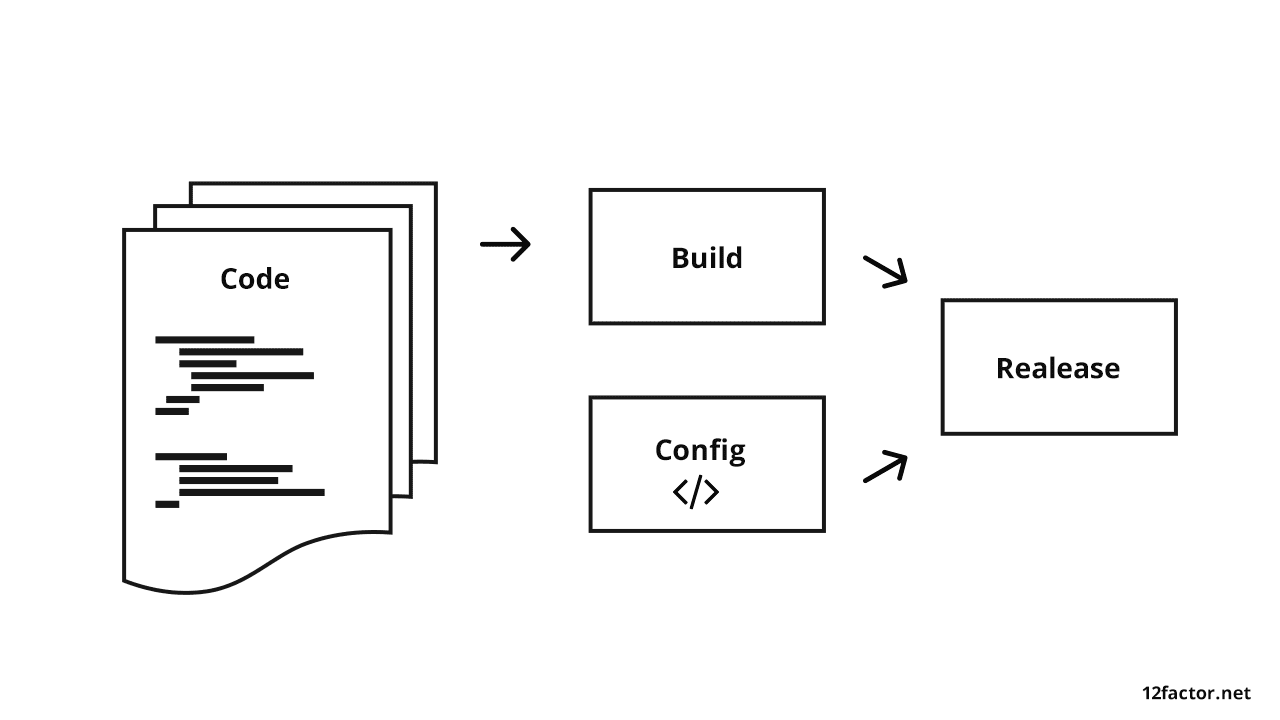
Best practice is to separate staging while app development

SOFTWARE DEVELOPMENT PIPELINE STAGES:

During the build stage – the code must be set, depending on the PHP libraries and CSS/JS assets that need to be prepared. Finally, the Docker container with a version tag has to be built and pushed into the Docker registry. You’ll also have the option of executing unit tests and code sniffer.
At the release stage – combine the Docker container (produced during the build stage) with the configuration for the environment (staging, and/or production) where you will run your build.
At the run stage – execute the app in the selected environment with proper environment configuration. This will be based on the release stage.

Principle 6: Make processes, stateless, and store the data outside the Web application

Leading web development practices recommend the storage of persistent data in separate services. It can be any relational database, for example, like Redis, Amazon S3, and so on.
However, if you’re working with Docker, you don’t have to store all the data inside the container. This is because your app has to be stateless.
Going forward, this approach will be critical to scalability. If you need authorization in your API, you can use stateless JSON Web Tokens, or you can use sessions, but store them in Redis.
The Symfony framework can work both ways, and such techniques enable scalability benefits. For example, you can run one container or hundreds of containers that use the same code and work with the same services.
You can restart your cluster (or a bunch of containers) or run a new one with a new version-without data loss.
At some point during the growth cycle, you’ll need more than one server. At this juncture, the software will start running on several servers using a load balancer.
It’s the best approach to orchestrate the execution of functions and various requests. This is the exact moment when all the processes have to be stateless.
The users will be authorized on one server, but their requests will be pointed to another server to be executed. Unless the authorization service is stateless (and can support both servers), the user won’t be able to continue running the app due to lack of authorization on the second server.

Principle 7: Keep software self-contained and export services via port binding

All web apps have to be made available without dependencies. If an app uses several services, each service has to be made available via separate ports.
Once you run Docker Compose on the developer’s local machine, for example, the application will become available on http://localhost:8085. At the same time, a separate GUI for Database management services will be available on http://localhost:8084.
Such an approach allows us to run many Docker containers and use load balancers (like HAProxy and Amazon Elastic Load Balancing.)
If the development team refuse to follow this approach, it’ll make the launch process more complicated. All the unnecessary (extra) steps may create additional bugs in the system.

Principle 8: Apply the process model with NO sharing

As the web application is developed, there will be a variety of processes running within the app. However, it’s important to keep all these processes separate. You can even divide these processes into separate ones if some of them are getting “too heavy” to manage.
So nothing has to be shared between several different processes. It’s the best way to keep the application simple and stable. What’s great about this approach to web application architecture is the fact that it makes it easy to scale.

BELOW, YOU’LL FIND THESE RECOMMENDATIONS ILLUSTRATED WITH A PHP DEVELOPED MULTI-TENANT APPLICATION:

  • The app can run as many PHP containers as needed to scale (up or down).
  • It can work for as many clients as needed.
  • If we need to handle more HTTP requests, we can just add more running PHP containers.
  • If we need to handle more background tasks, we can add more containers with background workers to handle these needs.
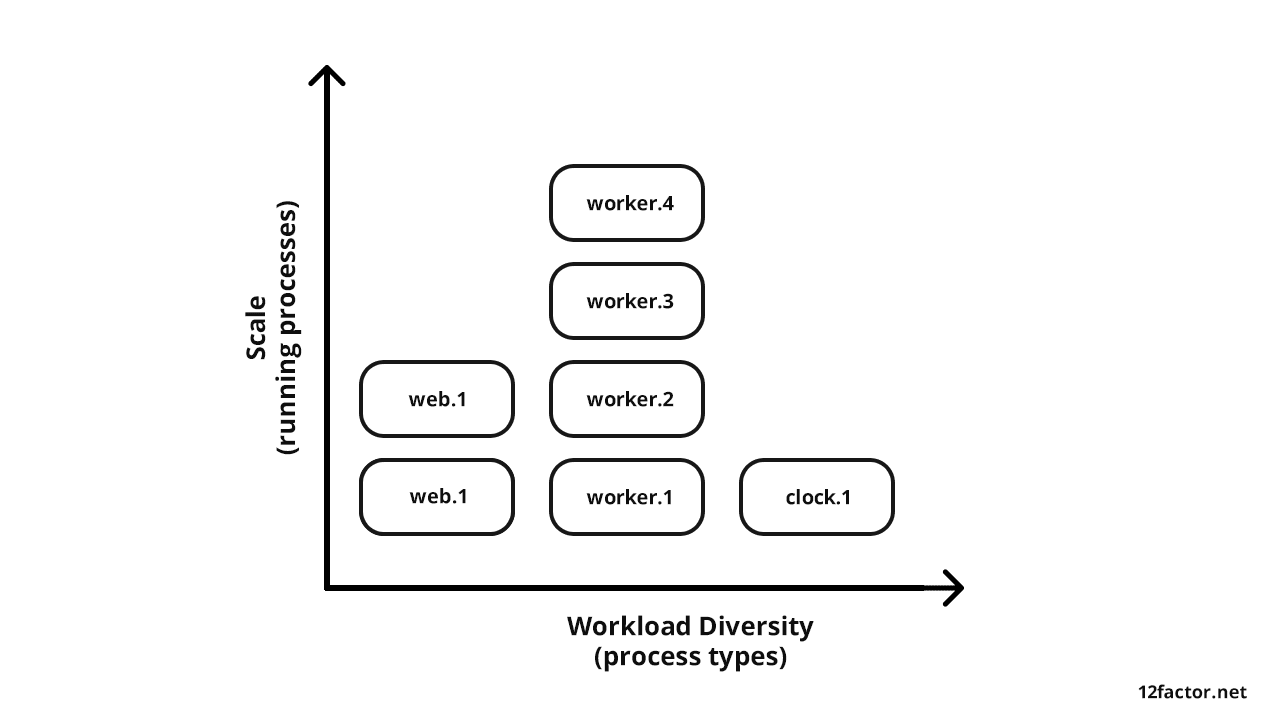
Multi-tenant web application processes architecture

Principle 9: Stay sustainable with fast launching and shutting down processes

All web applications have to be developed in a manner that enables scaling (up or down) at will. It should be able to run 100 containers, for example, during business hours (when the app users are most active), and run ten containers at night (to save money allocated for the infrastructure).
This approach can be applied to your software product by containing the processes, separately. However, you have to enable them to be launched or terminated rapidly.
That’s why minimization of the launch time for processes is a must. If you use Docker, you can run more PHP containers.
The container image should be ready for launch. Don’t compile at startup, and don’t run PHP Composer during the launch. The time to launch should always be as short as possible.
When you want to scale down, all you have to do is shut down some containers. It’s also critical to shut down the containers without disrupting the system.
Users don’t want to see request timeout or error messages. So use proper termination signals by sending daemons, like in most queue servers.
RabbitMQ and Beanstalkd are great examples that work efficiently in the background and queue the job in case of failure. You should also apply transactions to the Relational Database.

Principle 10: Keep development, staging, and production stages as similar as possible

The development, staging, and production environments have to be as similar as possible. Following this rule will help web application development teams avoid situations like a production software failure (which often happens when the web app was developed under different conditions).
There are some cases where the developer can run an application on a local machine with Docker and use the same Docker containers for staging and production. To use something that works only in the cloud, it’s better to go with the Adapter pattern.
For example, the production Docker cluster uses the same containers that were tested on staging but with different environment variables. The PHP and PostgreSQL versions will be the same (and unchanged), but the latter will run on Amazon RDS.
Log level is different as the users don’t see details about errors like the ones seen on the developer’s machine or staging server. Anyway, we will still receive reports about errors (with error details) in our error log aggregator server. This way, you’ll know about the error before users report it.

Principle 11: Good practice collecting application logsis is to perceive them as event streams

Software engineers should approach logs as event streams and not a steady stream of data that’s headed for storage. It’s the optimal way to reach high-visibility while running an application.
Storing logs as separate files for each Docker container (or separate services) should not be an option for your team.
By default, the Symfony PHP app writes logs on to log files, but you can configure the logs output to Linux stdout/stderr stream. You can do this by setting “php://stderr” string in the log path.
After that, you will be able to see all active logs from the console. Anyway, such an approach will be good for development but not good enough for production. You can see the logs while your Docker container is running but not after the container has been terminated.
For production, I would highly recommend the use of log aggregator services. Sentry, Graylog, Logstash, or Splunk are excellent examples.
Such services can aggregate logs from all running containers and enable analysis from a centralized platform. You can also leverage notifications to be informed about production issues and avoid losing data logs after a crash.

Principle 12: Manage admin activities as one-off processes

Administration and management activities play an integral part in the development and deployment of software products.
Database migrations, operations with cache, creating new system users and backups are just some examples. All these web development principles have to be applied to those activities as well.
Symfony provides a bin/console command to handle admin/management tasks. It’s best to run such commands as a one-off process in the same identical environment as the regular long-running processes of the app. It means that we need to run a new container for just one task instead of using an existing container.
Here’s an example of how Symfony accomplishes database migrations in Docker:

Example of DB migration with Symfony and Docker
We use Docker run, not Docker execute. This command works with the container that’s already running. After the migrations are complete, the Docker container can be exited. This will be a one-off process.

Achieve web application stability and scalability

All the web application development principles mentioned above should act as a baseline for your software development team. Such implementations should also be made wisely and aligned with business priorities.
They should be technically reasonable and seamlessly applicable to specific use cases. If you choose to ignore one or more of these best practices, there should be an excellent reason for it.
The key to a successful web development project is to create a culture of CI. It matters because it’s becoming effortless to automate things like deployments, updates, and setting up infrastructure for new users. Check our Case study on creating Advisory Web Platform For Education & Mentoring with CI.

Conclusion

In conclusion, it’s critical to follow these steps and only divert from it when it’s absolutely necessary. When followed accordingly, these development principles ensure that your software is stable and ready to scale.
It has paid dividends time and again in my software development career and promises to do the same for you in your next web development project.

Friday, April 17, 2020

The Lean Approach in Web Development


You’ve probably heard about the Lean Startup methodology, which describes how to release products in less time and with lower budgets. In this article, we explain how a web application development company can take advantage of the lean approach and its fundamental principles to build better software products and avoid wasting valuable resources.

Is the Lean Startup only for startups?

Even though the name of this methodology includes the word startup, it isn’t used only by startups. This approach can be adopted whenever there’s extreme uncertainty (a concept suggested by Eric Ries) concerning the target audience’s needs. And a company doesn’t necessarily have to be a small startup. When it comes to web application development, a large company can adopt Lean Startup principles to build new products too. As we can see, the Lean Startup works best for building high-risk products.
A central concept of the Lean Startup is the Build-Measure-Learn feedback loop. The point is to develop a product quickly and put it into users’ hands to receive feedback. This feedback is then analyzed to discover what features customers actually want and to let the company see if the product has demand. This approach helps companies make data-driven decisions. If there’s demand for a product, it can be improved further. Then the process is repeated to receive user feedback on the new features. If there’s no demand for a particular product, it can be redesigned according to the market need.

Build measure leran - rubygarage

This approach helps entrepreneurs avoid situations when they spend years building a new product only to discover that nobody wants to use it. The Lean Startup methodology helps companies avoid adding unnecessary features and spending more resources than a product actually requires.

How does the Lean Startup approach work with software development?

There are some fundamental principles of the Lean Startup that can be used in software development. They include building a minimum viable product (MVP), A/B testing, and using validated learning. Let’s see how these practices can help when developing software products.

Minimum viable product


MVP technology consulting - rubygarage

An MVP is a prototype that includes only key features. As Eric Ries notes, an MVP is about getting validated learning with the least effort. So the main goal here is to release a basic model of a product in order to get and analyze user feedback. This will help you realize what changes you need to make to improve your product. With an MVP, you can start learning and adapt your product to users’ needs as early as possible.
However, building an MVP shouldn’t be taken too lightly. An MVP should be good enough to let users see the potential of your product. It’s easier to find early adopters when you offer a high-quality and usable product.
Things to remember about an MVP:
  • It should include only the most necessary features.
  • It should provide enough value to demonstrate future benefit in order to retain early adopters.
  • It should help to gather user feedback.
Lots of today’s influential tech companies have managed to create popular products by developing MVPs first.
For example, the founders of Buffer ‒ a social media scheduler ‒ started their business by testing whether people needed their product. To find out what people thought of their idea, they launched a two-page website, keeping it as simple as possible. It was just a landing page explaining what the app would do. After discovering that people were interested, the Buffer founders needed to find out if people were ready to pay for their product. So they added a page with pricing. Then they analyzed the results and moved on to building the first version of the product.

A/B testing


How web development company can use A/B testing - rubygarage

The concept of A/B testing lies in offering several versions of a product to users at the same time. A/B testing can show if a change, even a slight one, has an impact on customer behavior. And if it does, you can measure how big of a difference it makes.
In terms of web application development, A/B testing can help to test different versions of pages to see which is more effective. The result can be analyzed by calculating the conversion rate or other metrics depending on your goal.
The aim of an A/B test is to check a hypothesis and measure which version of a product works best.
Upworthy, a viral content portal, turned to A/B testing to test layouts and designs for recommended content on their news and media website. They wanted to provide users with recommended content but were afraid it would decrease the number of social shares. Upworthy took a two-step approach to check that assumption. First, they tested out seven different layouts with their users. Once they found which one performed best, they moved on to the second phase, testing different designs. As a result, they found out that with a right sidebar and a minimalist design, Upworthy could increase social shares by 28 percent.
We rely on testing to just make better decisions. People are really fascinating and interesting… and weird! It’s really hard to guess their behaviors accurately.
Peter Koechley, Co-founder of Upworthy

Validated learning

Building an MVP and performing A/B testing leads to what’s called validated learning. An essential part of the Lean Startup methodology, validated learning helps with making data-driven decisions.
The process of validating product-related ideas is iterative, where testing one idea is one iteration. Results are measured by metrics. Validated learning happens when ideas and features are improved and there’s a positive change in metrics. Website features and their impacts can be tested by tracking visitor behavior.
Spotify, for instance, created an MVP and iterated, taking into account user feedback they gathered to improve the product. This approach helped them realize what their customers wanted and avoid risks.
The Dropbox founders adopted the Lean Startup methodology at the very beginning. They first made a demo video explaining how their product would work. This video helped them generate interest at the early stage, engage users in the development, and learn how to improve the product. For Dropbox, the key to success was giving customers the exact product they wanted.

Pivot or persevere


Pivot or persevere principle - rubygarage

When you test a concept, there are basically two outcomes. In the first case, you find out there’s a need for the product. So it makes sense to persevere with the same idea and keep on improving it. In the other case, you discover there’s no need for this particular product. That means you need to pivot to test another hypothesis, repeating the Build-Measure-Learn loop.
There are several options when it comes to pivoting. For instance, having analyzed feedback, you might need to consider building the entire product around a single feature. This is called a zoom-in pivot. Sending money by email became this feature for PayPal. When they discovered that their customers preferred using email for payments, they did a zoom-in pivot.
A zoom-out pivot is in the opposite direction, making an existing product one of the features of a new bigger product. There are other options you can opt for as well. It all depends on what you discover during the process of validated learning. For instance, you might need to consider changing the problem you address, targeting different customers, or changing the technology you’re using.
It can be a difficult decision to make. But sometimes it’s necessary to look for a better way to reach your goal. In any case, your decision to pivot or persevere should be based on data, not an assumption.

Why use the Lean Startup in web development?

As you can see, the Lean Startup methodology can help entrepreneurs see if they’re on the right path. Using the principles of this methodology enables you to determine if a particular feature is worth spending time and money on.
Implementing Lean Startup practices can help you:
  • Understand if there’s a need for your product
  • Get feedback in order to improve your product, meet your target customers’ needs, and maintain loyalty
  • Avoid adding unnecessary features and wasting resources
  • Develop your product faster

Monday, April 13, 2020

Web Application Development - Guides, Resources, and Best Practices


Simply put, Web Applications are dynamic web sites combined with server side programming which provide functionalities such as interacting with users, connecting to back-end databases, and generating results to browsers.
Examples of Web Applications are Online Banking, Social Networking, Online Reservations, eCommerce / Shopping Cart Applications, Interactive Games, Online Training, Online Polls, Blogs, Online Forums, Content Management Systems, etc..

Technologies

There are two main categories of coding, scripting and programming for creating Web Applications:
I. Client Side Scripting / Coding - Client Side Scripting is the type of code that is executed or interpreted by browsers.
Client Side Scripting is generally viewable by any visitor to a site (from the view menu click on "View Source" to view the source code).
Below are some common Client Side Scripting technologies:
  • HTML (HyperText Markup Language)
  • CSS (Cascading Style Sheets)
  • JavaScript
  • Ajax (Asynchronous JavaScript and XML)
  • jQuery (JavaScript Framework Library - commonly used in Ajax development)
  • MooTools (JavaScript Framework Library - commonly used in Ajax development)
  • Dojo Toolkit (JavaScript Framework Library - commonly used in Ajax development)

II. Server Side Scripting / Coding - Server Side Scripting is the type of code that is executed or interpreted by the web server.
Server Side Scripting is not viewable or accessible by any visitor or general public.
Below are the common Server Side Scripting technologies:
  • PHP (very common Server Side Scripting language - Linux / Unix based Open Source - free redistribution, usually combines with MySQL database)
  • Zend Framework (PHP's Object Oriented Web Application Framework)
  • ASP (Microsoft Web Server (IIS) Scripting language)
  • ASP.NET (Microsoft's Web Application Framework - successor of ASP)
  • ColdFusion (Adobe's Web Application Framework)
  • Ruby on Rails (Ruby programming's Web Application Framework - free redistribution)
  • Perl (general purpose high-level programming language and Server Side Scripting Language - free redistribution - lost its popularity to PHP)
  • Python (general purpose high-level programming language and Server Side Scripting language - free redistribution)

Program Libraries

Program libraries are a collection of commonly used functions, classes or subroutines which provide ease of development and maintanance by allowing developers to easily add or edit functionalities to a frameworked or modular type application.

Web Application Frameworks

Web Application Frameworks are sets of program libraries, components and tools organized in an architecture system allowing developers to build and maintain complex web application projects using a fast and efficient approach.
Web Application Frameworks are designed to streamline programming and promote code reuse by setting forth folder organization and structure, documentation, guidelines and libraries (reusable codes for common functions and classes).

Web Application Frameworks - Benefits and Advantages

  • Program actions and logic are separated from the HTML, CSS and design files. This helps designers (without any programming experience) to be able to edit the interface and make design changes without help from a programmer.
  • Builds are based on the module, libraries and tools, allowing programmers to easily share libraries and implement complex functionalities and features in a fast and efficient manner.
  • The structure helps produce best practice coding with consistent logic and coding standards, and provides other developers the ability to become familiar with the code in a short time.

Coding Guidelines, Standards & Convention

Coding guidelines are sets of rules and standards used in programming a web application project.

These rules and standards apply to coding logic, folder structure and names, file names, file organization, formatting and indentation, statements, classes and functions, and naming conventions. These rules also enforce writing clear comments and provide documentation.

Important benefits of using Coding Guidelines

  • Creates the best environment for multiple programmers to work on the same project
  • Provides ease of maintainability and version management
  • Delivers better readability and understanding of the source code
  • Insures that other developers can understand and become familiar with the code in a short time

Web Applications Lifecycle Model

Web Application Lifecycle is the process of developing a web application and involvement of the multiple teams that are engaged in the development process. Each organization may set forth its own unique style of operating.
Some companies follow a certain standard model such as SDLC (System Development Life Cycle) or Agile Software Development Model.
  • SDLC is the traditional process of developing software or web applications by including research to identify and define the application requirements, information analysis, architectural design and specifications blueprint, team involvement, programming, testing and bug fixing, system testing, implementation and maintenance.
  • Agile Software / Web Application Development is the iterative development process and development process practices that focus on collaboration of people involved and provide a better procedure to allow revisions and evolution of web application requirements. Agile methodology includes research, analysis, project management, design, programming, implementation, frequent testing, adaptation and maintenance.

Web Application Development Process

Web Application Development Process organizes a practical procedure and approach in application development.
The following list of procedures and suggested documents provide a good outline for a Web Application Lifecycle and Process:
  • Roadmap Document: Defining Web Application, Purpose, Goals and Direction
  • Researching and Defining Audience Scope and Security Documents
  • Creating Functional Specifications or Feature Summary Document
  • Team Collaboration and Project Management Document
  • Technology Selection, Technical Specifications, Illustrative Diagram of Web Application Architecture and Structure, Development Methodology, Versions Control, Backups, Upgrades, Expansion and Growth Planning Document, Server Hardware / Software Selection
  • Third Party Vendors Analysis and Selection (Merchant Account and Payment Gateway, SSL Certificate, Managed Server / Colocated Server Provider, Fulfillment Centers, Website Visitor Analytics Software, Third Party Checkout Systems, etc.)
  • Application Visual Guide, Design Layout, Interface Design, Wire Framing
  • Database Structure Design and Web Application Development
  • Testing: Quality Assurance, Multiple Browser Compatibility, Security, Performance - Load and Stress Testing, Usability
  • Maintenance

Web Application Testing

Testing is an important part of the Web Application Development process. On occasion, testing would consume more manpower and time than development itself.
Below are some of the most common testing needed for any web application development process:
  • Quality Assurance and Bug Testing
  • Multiple Browser Compatibility
  • Application Security
  • Performance - Load and Stress Testing
  • Usability

Trends and Popularity

The demands for companies to build Web Applications are growing substantially.
If planned and built correctly, web applications can:
  • Reach and service millions of consumers and businesses
  • Generate substantial, multi-layer / multi-category income from consumers, businesses and advertisers
  • Easily build business goodwill and assets based on audience reach, popularity, technology and potential growth

Below are good reasons for companies to build web applications:
  • Companies want to streamline their internal departments and functions, operations, sales and project management, etc.
  • Companies want to take advantage of a web based application's flexibility and versatility, by moving away from the traditional desktop application platform to the web application platform
  • Companies want to gain more clients or better service their current clients by offering convenient services and solutions online
  • Companies want to build new web applications to offer innovative services or solutions to online users and businesses

Business Impact

Today's web applications have substantial business impact on the way companies and consumers do business such as:
  • There are opportunities to gain the upper hand and bypass the traditional brick and mortar companies when this type of opportunity was rarely possible or existed before the explosion of the web
  • The new web created a global business environment which challenges the way in which traditional companies do business
  • Companies need to reinvent and evolve in order to compete in today's trends, online business and global marketplace
  • Businesses and consumers have more options and resources to research and easily compare and shop around for the best deals
  • Information and resources are immense and available to everyone who seeks it
  • Businesses or companies who used to profit from consulting or advice, that can now be easily acquired online are struggling, and will need to take a new business direction if they want to stay solvent.

Wednesday, March 25, 2020

9 Must Decisions in Web Application Development


So you’ve decided to create a web application? Great, welcome to a world without any easy choices. There is a vast amount of different great technologies in every step you are going to make. And for every option, you will find a notable company like GoodCore Software UK that used it with great success.
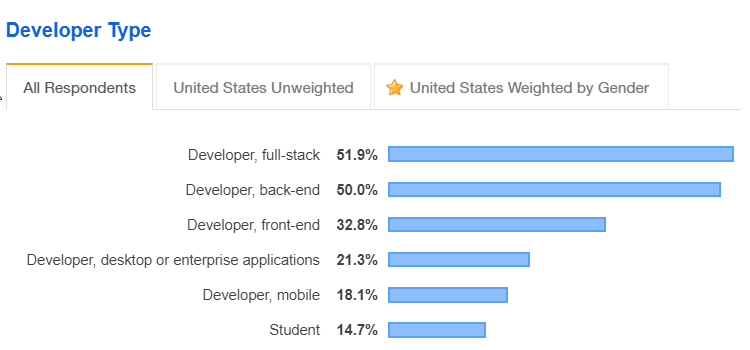
The web development market is huge. It’s the biggest programming space by far, with never-ending technology options. Looking at the StackOverflow survey of 2019, 52% of all developers are full-stack developers, 50% are back-end developers and 32.8% are front-end developers.
StackOverflow Developer Type Survey
As you can probably guess, 134.8% of all developers is a pretty big market.
There are many popular technologies, databases, philosophies, design patterns and methodologies in the software world. They change drastically every few years, but somehow the old ones never seem to die. Cobol and ClearCase are great examples of something that shouldn’t still exist but clearly does.
We will talk about 9 technological choices you have to make when developing a proper web application. Some will not be relevant to your product, but most will be. A lot of these choices give way to an entirely new group of choices, but that’s just modern-day development.
I’m mostly a .NET developer, but I’ll try to stay objective and not to express too many personal opinions.
This article is talking about web applications, not websites. The distinction is a bit hard to put into words. Blogs and standard e-commerce sites are websites, whereas interactive websites like eBay and Facebook are web applications. Pretty much anything you can’t build (easily) with WordPress is a web application.

1. Client & Server Architectural Pattern

Since the internet came to life, we developed many different ways to build web applications. We had CGI, PHP, ASP, Silverlight, WebForms, and a bunch of others. In the last 10-15 years, we came to agree on 2 architectural patterns: model-view-controller(MVC) on the server-side or single-page-application (SPA) on the client side and Web API on the server side. Out of those two, the second approach (SPA + Web API) is getting the most traction in recent years.
The first decision in your web application is to choose an architectural approach.

Single Page Application (SPA) and Web API

Ever since AngularJS was released in 2010, SPA and Web API combination gradually became the most popular way to write modern web applications. And with some good reasons. With this pattern, the entire client side part of the application is loaded just once rather than loading each page from the server. The routing is done entirely on the client side. The server provides just the API for data.
There are many advantages to this approach:
  • Sine the entire client is loaded once in the browser, the page navigation is immediate and the web application experience becomes more like a desktop application experience.
  • Separation between client-side and server-side. There’s no longer necessity for full-stack developers (that know both server-side and client-side).
  • Testing both the client and server is easier because they are separate.
  • Your Web API server is reusable for any type of application – web, desktop, and mobile.
And some disadvantages:
  • Initial project setup is slower. Instead of creating one "new project" in your favorite MVC framework, you now have separate projects for the client-side and server-side. You’ll have to deal with more technologies overall.
  • Slower first-page load. In a SPA we are loading the entire client-side for the first page.
  • You’ll have to use bundlers like webpack for a decent develop experience. This adds some overhead like having to deal with bundler configuration. However, this is also an advantage because the bundler allows to easily add more tools to the build chain, like babel and a linter.

Model-View-Controller (MVC)

The server-side MVC pattern got popular in 2005 with the release of Ruby on Rails and Django frameworks.
In MVC, each route request goes to a Controller on the server. The Controller interacts with the Model (the data) and generates a View (the HTML/CSS/JavaScript client-side). This has several advantages. It creates a nice separation of concern between the client, server, and the different components. As a result, more developers can work on the same project without conflicts. It allows to reuse components. Since the Model is separate, you can replace it with a testable data set.
Some popular MVC frameworks are Ruby on Rails, ASP.NET MVC, Django, Laravel, and Spring MVC
You can somewhat combine between MVC and SPAs. One View can be a single page application on its own. This is best done with thin SPA frameworks like Vue.js.

Others

There are a couple of other ways you can go, which aren’t considered great options nowadays. They are old technologies, which were replaced for a reason. Some of those are:
  • Classic ASP
  • Classic PHP (without MVC)
  • WebForms
  • Static pages and Web API (this is still valid for static content, but not for a web application)

2. Server-side Web API (when choosing SPA & Web API)

If you chose to go with a single page application (SPA) framework, then the next step is to choose a server-side technology. The standard means of communications are HTTP requests, so the server will provide an HTTP API. This means the server-side and client-side are decoupled. You can also consider using a RESTful API pattern.
There’s an abundance in great server side technologies. This is both a blessing and a curse. There are so many good choices that it becomes difficult to choose. Here are some of the more popular technologies:
  • Node.js – JavaScript
  • ASP.NET Web API – C#
  • Java – Spring, Jersey, Apache CXF, Restlet
  • Python – Flask, Django REST framework
  • Go
  • Ruby – Sinatra, Ruby on Rails – Rails is mostly MVC, but Rails core 5 supports API-only applications.
All of these frameworks are free and most are open source.
This is not an exhaustive list, but those are the most popular technologies. Choosing a popular framework is important. It probably got popular for a reason. A popular framework will have better support, better documentation, and more documented issues. Perhaps most importantly, you’ll find more developers that are familiar with that framework.
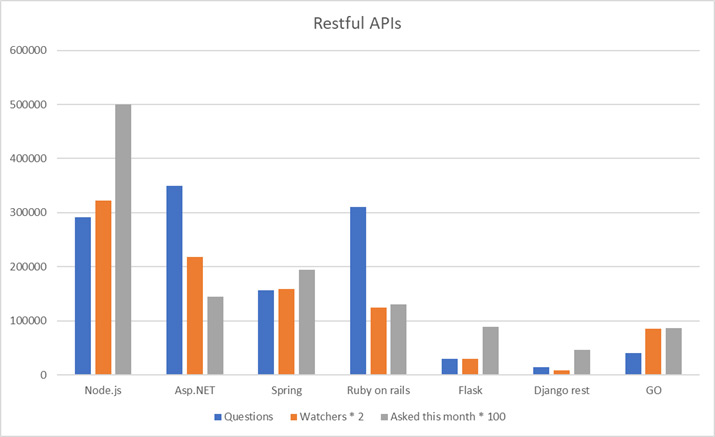
Checking market popularity with Google Trends and surveys in this particular category was a bit difficult. Instead, we can see popularity by looking at Tags in StackOverflow. We can see overall usage according to the total number of questions asked. And we can see the trends according to the number of questions asked in the last month. This is not a perfect indicator of popularity, but I think it’s pretty good. Here are the results:
Backend frameworks trends
Node.js, for example, has 291K questions, 161K watchers and 5K questions asked this month
The big 4 winners are Node.js, ASP.NET, Spring, and Ruby on Rails. Flask, Django REST and GO are much less popular. However, this is not a fair comparison. Spring, ASP.NET, and Ruby on Rails are primarily MVC and not API-only, so they really have a much lower value. Go is a programming language, so it’s overvalued as well. On the other hand, Django-rest, and Flask are server-side API technology only, so their value is "real". Node.js is also not an MVC framework, rather a technology to run JavaScript natively. But, it’s mostly used for Web API with something like Express.js framework.
Keep in mind that even though Node.js is clearly the most popular, the other ones are still extremely popular technologies.
Java Jersey, Apache CXF and Ruby Sinatra usage was so much lower in comparison that I didn’t even include them in the chart. There are probably hundreds of other lesser known frameworks that don’t appear as well.
Besides popularity, here are some more considerations when choosing:
  • For web applications that provide big-data analysis, consider going with a Python backend.
  • Do you want to work with a strongly-typed programming language like C#, Java, and Go? Or weakly typed languages like JavaScript, Ruby, and Python? This is a big consideration. Make sure your development team is comfortable with the language.
  • With Node.js, you work in the same language in client-side and server-side. I claim that’s way too much JavaScript, but the world seems to think it’s a good idea.
  • Which development technologies are more popular in your area of the world? Prefer those.
  • If you love C#, but afraid to be stuck with a Microsoft proprietary tech that’s tightly coupled to Windows, then fear no more. The latest versions of ASP.NET (.NET Core) are open-source, work on Linux and have great performance on top.
  • If you have a team that’s already experienced with a framework or language, go with their known technology. This consideration trumps all others.

3. Server-side MVC (when choosing MVC)

Like with Web API, there’s a big selection of server-side technologies that use the MVC pattern. Up to a few years ago, the MVC pattern was by far the most popular way to build web applications. The most notable frameworks are:
  • C# – ASP.NET MVC
  • Java – Spring MVC, Apache Struts, Play Framework
  • Groovy – Grails Framework
  • Python – Django
  • Ruby – Ruby on Rails
  • PHP – Laravel
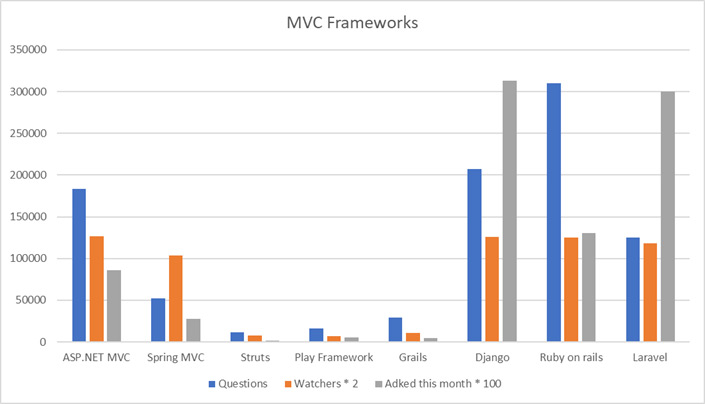
And here’s the popularity contest results according to Stack Overflow Tags:
Backend MVC frameworks trends
This is a normalized chart. ASP.NET MVC, for example, has 183K questions, 63K watchers and 856 questions asked this month.
These results were interesting and quite surprising for me. I expected Ruby on Rails, Spring and ASP.NET MVC to be on top. Instead, I found that Django, Ruby on Rails and Laravel were the most popular frameworks. Ruby on Rails has the most questions in all times. Django and Laravel seem to be rising in popularity with the most questions asked in the last 30 days.
Besides popularity, the additional considerations when choosing a framework are similar to the ones for Web Api server side:
  • For web applications that provide big-data and statistics, consider going with Python Django.
  • The strongly typed vs weakly typed language is still a consideration.
  • If you have a team that already knows and loves a framework or a language, go with the already-known known technology.
On a personal note, I’m dumbfounded that PHP is gaining popularity.

Performance Benchmarks – for Both Web API and MVC

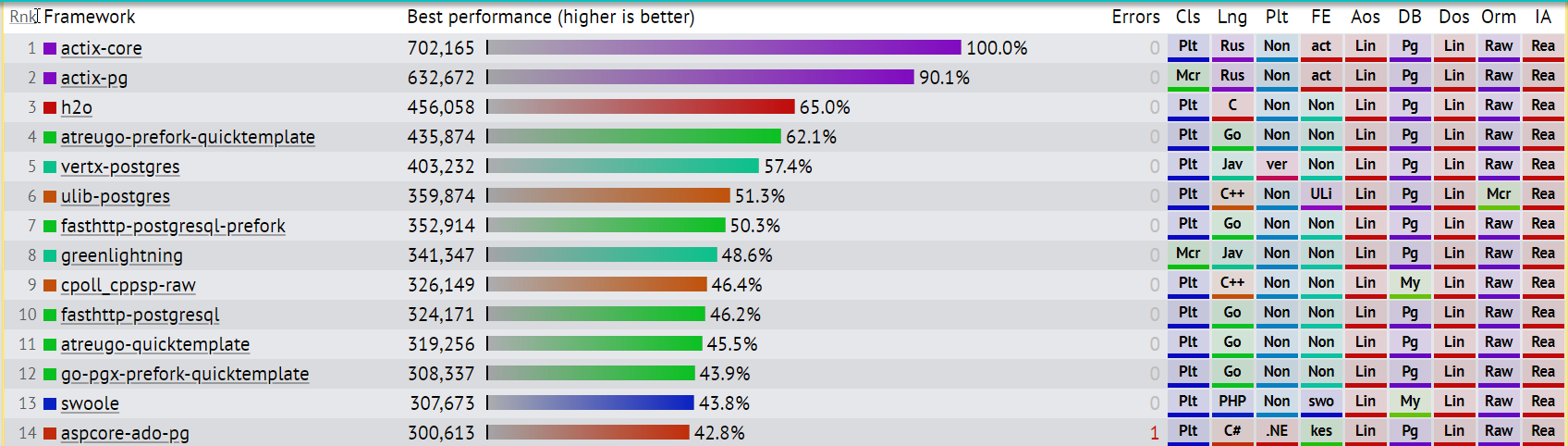
If you’re building a small business web application, performance might not matter as much. But for big applications that should serve many requests, response times are crucial. The most notable performance benchmarks comparison site is https://www.techempower.com/benchmarks/. Here, you can find a huge list of frameworks and various server configurations. Those are all benchmarked and compared into something like this:
server-side performance framework benchmarks
The candidates in the above test include a server with a web framework, a database, and an ORM. In the benchmark, the framework’s ORM is used to fetch all rows from a database table containing an unknown number of messages.
If we go by language, the fastest is Rust, followed by C, Go, Java, C++, PHP, C#, and Kotlin. If we go back to our "popular" frameworks and look for them, we’ll find this:
  1. ASP.NET Core Web API (42.8% of best result)
  2. Node.js variation (17.9% of best result)
  3. ASP.NET Core MVC (17.2%)
  4. Spring (4.4%)
  5. Laravel variation (2.9%)
  6. Django (1.9%)
  7. Ruby on Rails (1.3%)
By the way, the #1 performance winner Actix is a Rust language framework that I didn’t include due to its very low popularity.

4. Choosing a Single Page Application (SPA) Framework

If you chose to use a Web API and SPA (not MVC), then the next decision is to choose a SPA Framework.
Just a few years ago, a new JavaScript framework sprouted about once a week. Luckily, those days are behind us and the field stabilized a bit.
The most notable SPA frameworks of all times (well, since 2010) are:
  • React
  • AngularJS
  • Angular (2+)
  • Vue.js
  • Ember.js
  • Polymer
  • Aurelia
  • Backbone.js
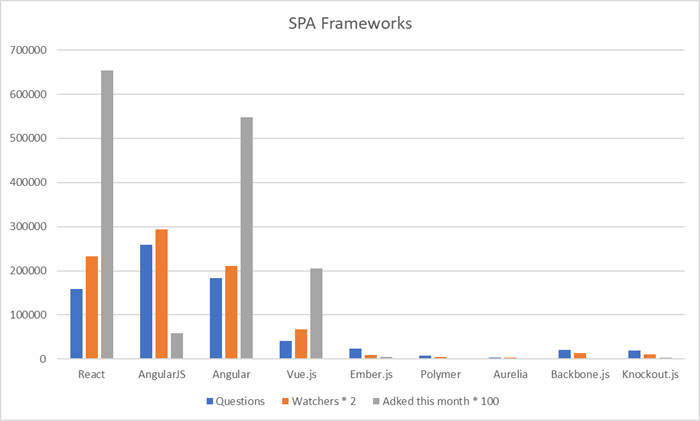
Let’s do our usual trick with StackOverflow:
Single page applications comparison
So this chart shows a few conclusions at a glance:
  1. All past frameworks except for React, AngularJS, Angular, and Vue.js are dead. If you’ve been following web development news in the past few years, that should come as no surprise.
  2. AngularJS has the most questions but the least new questions. Even though there’s probably a huge amount of code written with AngularJS, it’s a legacy framework. It’s not recommended to choose it for new projects.
  3. React and Angular dominate the market with Vue.js a distant 3rd. React in particular has the most interest.
This means your best choice in 2020 is between React, Angular, and Vue.js. These frameworks have the best community support, the most documented issues, and the best component/library support. With React and Angular having the most support.
Here are a few more points to consider:
  • Angular was built as a sort of "enterprise" framework that considered everything and forces you into a particular mode of work. React and Vue.js are more separated into components and allow you to pick and choose development approaches.
  • React won the "Most loved web framework" title in StackOverflow survey of 2019, with Vue.js a close second.

5. Database

Every modern web application has some sort of database. Or several databases even. In the old days, there were just relational databases and the differences were in performance and features. Today, we’re in the age of "specialized databases". We need different databases for different purposes, which makes this decision pretty important. I’d say even more important than the previous decisions of server-side and client-side technology because those offer pretty much the same thing in different flavors.
It’s important to understand your business needs when choosing a database. If your product needs high-performance Search capabilities, consider using Elastic Search. If you have a high-load of similar requests, whose response doesn’t change very frequently, consider using Redis for its caching. If you just want to store a bunch of JSON documents without much fuss, then go with a document-store database like MongoDB.
Databases can be divided into several types:
  • Relational Databases – A classic table database that works with SQL queries like Microsoft SQL Server.
NoSql databases:
  • Document-store databases like MongoDB
  • Key-Value stores like DynamoDB and Redis
  • Wide column store like Cassandra
  • Graph-based database like Neo4j.
Before choosing a specific database, it’s best to decide on the type of the database you need.
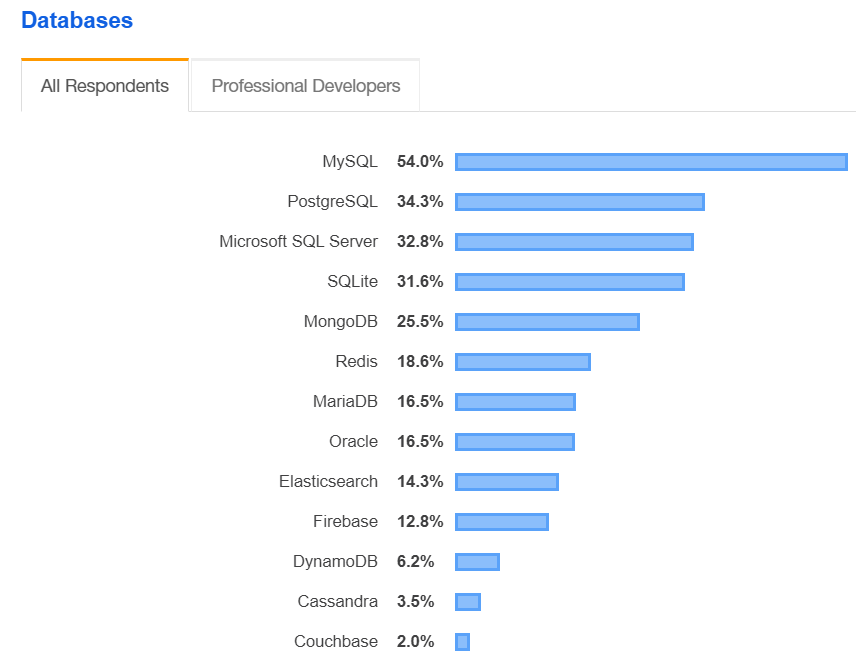
Like with other technologies, choosing a popular database is very important. You’ll have more forums, bigger community and more developers familiar with the technology. Besides, they probably got popular for a reason. According to Stack Overflow 2019 survey, the most popular databases are:
popular databases 2019
MySQL is by far the most popular database. Note that the all 4 first spots are filled with relational databases. This might serve as some kind of indication that relational databases are the best choice in most applications.
Here are a few points to consider when choosing:
  • Some of the commercial databases like Oracle and SQL Server can be quite pricey. Consider using one of the many open-source databases if the cost is an issue and you have a lot of data.
  • Relational database stood the test of time. They are fast, reliable and have a ton of tools that work with them. You’ll also find more developers familiar with the technology.
  • If you’re using a certain cloud provider, see which databases they support as cloud-as-a-service. This can reduce some initial development time when starting out. You might not actually need your cloud provider because there are services that provide independent database-as-a-service services like MongoDB Atlas.
  • For small web applications, the considerations are different than for large enterprise applications. You’ll need databases with the ability to scale, possibly to multiple machines (sharding).
  • For distributed databases, consider the CAP theorem. It states that a database can provide only as much 2 out of 3 guarantees between Consistency, Availability, and Partition tolerance. Consider which two guarantees are most important to your needs and which database provides those two.
  • For big applications or apps with high-frequency requests, you’ll need to consider performance. One of the best places to find performance comparisons is DB-ENGINES. Here are the latest scores while writing this:
Database choice is obviously a huge topic and an important one. Unlike other decisions, I suggest giving this one more weight and do additional research.

6. Deployment

In 2020, we have a big variety of Cloud Offerings. I believe that deployment in the cloud is the best fit in almost all cases. With a few exceptions. So before comparing cloud service providers, let’s talk about why you would deploy to the cloud and what alternatives you have.
There are actually 3 options available:
  1. Cloud deployment – Instead of bothering with setting up your servers in the basement, you can rent compute power and storage from a company like AWS or Azure. In fact, ever since AWS was launched in 2006, the software world is changing in this direction. There are many advantages to this:
    • With the Cloud, you can use dynamic scaling to cut costs. In low-pressure times, reduce the number of servers and in high-pressure times increase them. Since you pay-per-minute or per-hour, you can dramatically decrease costs.
    • The initial setup and deployment are much easier. In some cases, like with Azure App Service, deploying to a server for the first time is literally a few clicks.
    • You need to employ much fewer sys-admins (but a few DevOps engineers).
    • You no longer need to buy server machines, store them in the basement and upkeep them. It’s all in the cloud man.
  2. On-premise deployment – On-premise servers is the way organizations worked up to 2006. You had a server room and an army of sys-admins to keep them running. In 2020, we still have a lot of on-premise deployments. These companies either started on-premise and just didn’t move to the cloud or they have some good reasons to stay on-premise. You should consider staying on-premise if:
    • You have some security or legal issues to place your server in the cloud. Maybe it’s software in the military and government sectors.
    • You’ve invested so much effort in your on-premise server farm that it no longer makes sense moving to the cloud. It can happen if you’re a big enough company and you’ve made your on-premise solution automated enough to justify the upkeep.
    • You’re big enough that it makes financial sense not to pay to the middle man. One example is Dropbox who aren’t in the cloud. They did the math and it makes sense for them to be on-premise.
  3. Hybrid cloud solution – The big cloud providers allow you to install a fully operational cloud server on-premise. That is, you’ll have an AWS or Azure portal installed in your own data center. Pretty crazy concept and not for everyone, especially due to the cost. Both Azure Stack and AWS Outposts require you to buy new customized hardware. Google recently released Anthos, which doesn’t require customized hardware.

Comparing Cloud Service Providers

Cloud services are divided into 3 categories: Infrastructure as a Service (IaaS), Platform as a Service (PaaS), and Software as a Service (SaaS). To deploy our web application, we’re interested in IaaS. The three dominant IaaS cloud providers are: Amazon’s AWS, Microsoft Azure, and Google Cloud Platform. Besides, it’s worth mentioning IBM Cloud, DigitalOcean, Oracle Cloud Infrastructure Compute, Red Hat Cloud, and Alibaba Cloud.
Besides AWS, Azure, and GCP, the only real competitor in terms capabilities is Alibaba. Unfortunately for them, major western enterprises are not so willing to work with a Chinese company.
The 3 big cloud providers have somewhat similar offerings. They all offer services like Scalable Virtual Machines, Load balancers, Kubernetes orchestrators, serverless offerings, storage as a service, database as a service, private networks & isolation, big data services, machine learning services, and many more.
Competition is fierce. Prices are somewhat similar and when one of the providers comes up with a new popular product, the other providers will adjust and offer similar products.

7. Authentication & Authorization
In practically all web applications we have a Sign-in mechanism. When signed in, you are identified in the web application and can: Leave comments, buy products, change personal settings and use whatever functionality the application offers. The ability of your application to verify that you are who you say you are is called Authentication. Whereas Authorization means permissions mechanism for different users.
There are a couple of ways you can go with authentication and authorization:
  1. The manual solution – Most web frameworks have support for authentication and authorization (usually with JWT tokens). If not, there’s always a free 3rd party library available. This means you can manually implement basic auth mechanisms.
  2. External Identity Server – There are several open-source and commercial identity providers that implement the OpenID Connect standard. This means that client-server communication will involve a dedicated identity server. The advantages are that these servers have already implemented a bunch of auth features for you. These might include:
    • Single sign-on and sign-out with different application types
    • Built-in support for external identity providers (Google, Facebook,…)
    • Role-based permissions (authorization)
    • Multi-factor authentication
    • Compliant with standards like ISO, SOC2, HIPAA,…
    • Built-in analytics and logs
Your cloud provider probably has an identity server, like AWS Cognito or Azure Active Directory B2C.
Notable open-source solutions are: IdentityServer, MITREid Connect, Ipsilon.
Notable commercial solutions: Auth0, Okta, OneLogin
Make sure to do some price calculations before committing to a commercial solution like Auth0. They tend to get kind of pricey and using an open-source implementation is also a good option.

8. Logging

Server-side logging is pretty important for any type of software, and web applications are not an exception. Whether to implement logging or not is not really a decision – implement logging. The decision is where to send these logs and hot to consume them.
Here are some logging targets to consider:
  • A database. Logging to a database has many advantages
    • You can retrieve the logs from anywhere, without access to the production machine.
    • It’s easy to aggregate logs when you have multiple servers.
    • There’s no chance the logs will be deleted from a local machine.
    • You can easily search and extract statistics from the logs. This is especially useful if you’re using Structured Logging.
    There’s a myriad of choices for a database to store your logs. We can categorize them as follows:
    • Relational Databases are always an option. They’re easy to set up, can be queried with SQL and most engineers are already familiar with them.
    • NoSQL Databases like CouchDB. These are perfect for structured logs that are stored in JSON format.
    • Time-series Databases like InfluxDB are optimized to store time-based events. This means your logging performance will be better and your logs will take less storage space. This is a good choice for intense high-load logging.
    • Searchable Solutions like Logstash + Elastic Search + Kibana (The "Elastic Stack") provide a full service for your logs. They will store, index, add search capabilities and even visualize your logs data. They work best with structured logging.
  • Error/Performance monitoring tools can also act as logging targets. This is very beneficial since they can display errors alongside log messages that were in the same Http request context. A few choices are elmah.io, AWS Cloudwatch and Azure Application Insights.
  • Logging to File is still a good logging target. It doesn’t have to be exclusive, you can log both to file and a database for example.
Once you have logging in place, I suggest doing a test run on retrieving them or searching them. It’s going to be a shame to wait until you have a bug in production only to find out that you have some kind of problem in your logging.

9. Payment Processor

In many web applications, you are going to be charging your customers. That is, receive credit card, PayPal or Bitcoin for services (well, not Bitcoin). Even though theoretically, you can implement payment processing yourself, it’s not recommended. You’ll have to deal with PCI compliance, security issues, different laws in different countries (like GDPR), frauds, refunds, invoices, exchange rates, and a million other things.
There are several big commercial players in this field like PayPal, Stripe, 2checkout, and BlueSnap. Those have a rich API and you can integrate the payment in your own site.
Here are some things to consider when choosing a payment processing company:
  • Security and PCI Compliance – Make sure your chosen payment processor has PCI compliance. Any company that handles credit card has to uphold this standard. All the major companies will be PCI compliant.
  • Fees – The standard fees in the industry are 2.9% of the transaction + 30 cents. Maybe some companies offer a cheaper rate.
  • Exchange Rates – If you have international customers, they will pay in their own currency. Check which exchange rates the payment processor charges.
  • Ease of API – One of the most important considerations is the ease of API. Be sure you will have a lot of interaction with the payment processor. You’ll want hooks on transaction events, modification of invoices, adding discounts or more fees, refunds, and so on. Stripe, in particular, is known for it’s excellent API.
  • Popularity – Big companies will have more forums and internet discussions. With PayPal or Stripe, that’s not going to be a problem. With big companies, you’ll also find more developers familiar with the framework.
  • Data portability – If you ever wanted to change payment processors, the current processor needs to allow that option. PayPal, for example, just won’t give you your customer’s credit card data. Whereas Stripe allows to export card data.

Summary

As you can see, web application development in 2020 is not getting any closer to a consensus. If anything, we have more technologies to choose from and as much controversy as ever. I guess this is good news for us developers since we can afford to have specialties and get paid extra for our respective narrow fields.
In almost all decisions, all the choices are pretty good. That means you won’t make a terrible mistake by choosing the one over the other. On the other hand, by choosing one you’re usually stuck with them. Suppose you chose to go with AWS and then decided to move to Azure. That’s not going to be that easy.
There were a lot more "Must" decisions I wanted to include like Error Monitoring, Application Performance Management tools, ORMs, Mobile support + PWAs, and Localization. Then, there are a bunch of client-side decisions like free or paid UI Controls, bundlers, linters, and so on. This article got a little bigger than I planned, so I’ll leave those to another post.
Thanks for reading, Cheers.