Monday, May 11, 2020

What Is Offshore Software Development and How to Do It Right


Many software companies across North America and Western Europe are starting to evaluate offshore software development company UK or worldwide and how it can help them to achieve their business goals. For those who consider this approach for the next project, we’re providing a detailed explanation of this outsourcing model. Here you’ll find more about its advantages and disadvantages and a few simple tips that will make a search for the reliable service provider a bit easier.


When starting a new software development project, many companies are used to involving not only their in-house teams or developers in their countries but also the ones from all over the world. This kind of cooperation has justified itself and resulted in the benefits for both sides. It is clear that outsourcing is an inevitable part of software engineering. Here comes another question what is offshore software development. In short, this term has the same meaning as the regular outsourcing but with the indication of the geographical distance between the customer and the provider.
List of the contents:
  • Difference between offshore, nearshore and onshore
  • Offshore software development firms and their typical service
  • Pros and cons of this model
  • Remote product development and how to do it right
  • How to choose the service provider
  • Conclusion


WHAT IS THE DIFFERENCE BETWEEN OFFSHORE, NEARSHORE, AND ONSHORE

Considering the geographical standpoint, outsourcing can be presented by onshore, nearshore and offshore development services.

Onshore

When the company decides to hire software developers within their own country, it is onshore outsourcing. They find this option rather convenient and approachable. For instance, the company can choose the provider just from the different regions of their country.

Nearshore

Nearshore service is characterized by a similar time zone. For this reason, providers will be chosen from the neighboring countries. The customers count on cultural similarity and geographic proximity. In particular, Western European countries have the nearshore choice among Eastern European ones such as Poland, Ukraine, Belarus, etc.. The USA customers can apply for the providers in the nearest neighbor Mexico. In case they decide to choose other Latin American countries, it will not be called nearshore one.

Offshore

Therefore offshore software development indicates that the company of providers is located in a foreign country far away from your country. It can be even a different continent thus the customers might face the notable time zone difference. Fortunately, nowadays it is not a problem at all. North American and Western European companies successfully collaborate with providers from all over the world.
In this article, we have prepared the explanation and overview of offshore development services, its advantages and disadvantages, and how to choose services provider.

Thursday, May 7, 2020

How Do Free Mobile Apps Make Money?


Do you have an idea for a free mobile application but you doubt whether it's worth investing? How do free apps make money?
Your doubts are quite clear: mobile IOS / android app development requires a lot of time (typically, several months) and, more importantly, money. Before kicking off the development process, you should clearly understand how you’ll recoup your investments and how to make money with apps in 2020.
We’ve decided to help you get your idea off the ground and show how exactly you can make money on free apps.

Free Apps Grossing Big Bucks

According to Sensotower, the App Store and Google Play users spent a total of $39.7 billion on mobile apps and games during the first half of 2019. This is a huge market you don’t want to miss out on
If you think that it’s the paid apps that bring the lion’s share of this huge revenue, you’re wrong. In fact, if you check the list of the top grossing mobile applications (including games) in the Google Play Store and the Apple App Store, you’ll notice they’re all free.
The vast majority of users on all continents prefer free mobile applications. In fact, the number of free app downloads is constantly rising. Statistics provided by Sensotower show that in the first half of 2019, free mobile apps downloads in Google Play increased by 16,4 percent and made up $41,9 billion. Whilst the App Store lost 1,4 percent in downloads. However, the overall tendency remains positive.
Mobile App Downloads 2019
Image source: Sensotower
Developing a free mobile app is definitely the right business strategy.
Before shedding light on how to make money with apps, we’d like to draw your attention to another matter: correct app presentation. Remember that users must be able to quickly find your app and understand what it’s designed for.

Incite User Interest Through Accurate App Packaging

As of the second quarter of 2019, there were 2.46 million apps (of all types) in the Google Play Store and 1.96 million in the Apple App Store. The competition is really strong!
How many users will find your free mobile app? How many of them will download it? No matter how good your app is and what monetization methods you use, you may still fail to attract customers without a clear app packaging.
Potential users of your app should be able to quickly find it through search in the Google Play Store and the Apple App Store. To make your mobile app visible and easy to find, you should provide it with an attention-grabbing name, an informative description, and screenshots.
Here are tips that will help you create a top-class app description:

Choose a Clear and Catchy App Name

Your mobile app should have a snappy name that reflects its major functions. Though many applications have names that convey nothing about their functionality, your app is likely to attract a lot more users if it has a name that hints at what it does. It’s particularly useful to include keywords in the app name.
In general, the name of your app shouldn’t be too long – 100 characters at most. Think carefully about the name, as it’s the first thing people see and pay attention to when they’re considering whether your application is worth downloading.

Come up With an Informative App Description

The next step is to provide your app with a meaningful and informative description.
The first several sentences (up to the “Read More” or “More” buttons) of an app description should give general information and illustrate the app’s main idea. This part mustn’t be long – up to 225 characters. Few people read further, so make sure to tailor this part of the app description to perfection.

Make Eye-Catching App Screenshots

An app’s name and description are important, but users want to know how your app will look on their mobile devices. That’s why you should include several screenshots – and make sure you pick the best.
We recommend that you add some text to your screenshots, describing some functions of your application.
As you can see, this screenshot shows that the app can work on smartphones, tablets, and smartwatches.
Note that Uber uses verbs in their screenshot descriptions, which is the correct approach. Verbs are the parts of speech used to describe actions.
People are more likely to act (i.e. to download your free mobile app) if they see verbs.

How to make money with free apps?

Now that you know how to package a five-star app, we can move on to explaining the strategies you can leverage to make money on free apps.

Strategy #1: In-App Purchases

In-app purchases is an extremely popular strategy used by thousands of apps in both the Google Play Store and the Apple App Store. In-app purchases allow users to buy something right in the app.
There are three major types of in-app purchases:
  • Consumable. Consumables are products that a user can use only once: for example, virtual money or health points. Such in-app purchases are usually used in mobile games.
  • Non-consumable. Non-consumables are features that users buy for permanent use: for example, additional functions or ad blocking (this is how free apps make money without ads).
  • Subscriptions. Your mobile application may offer subscriptions that unlock some content or functions for a certain period of time. Subscriptions can be either non-renewing or automatically renewing.

Strategy #2: In-App Ads

  • Ads are a driving force of the global market. They’re literally everywhere, and mobile apps aren’t an exception. In-app ads are actually tools of affiliate marketing. With in-app ads, you advertise your affiliates’ products (apps, games, etc.) inside your app and get paid if your users interact with those ads.
    There are several types of campaigns used in affiliate marketing, so let’s mention the most popular:
    • Cost per click (CPC). This model means that you get paid for each click on ads displayed in your mobile application. Typically, a single click is nearly worthless, so revenue is calculated on a cost per mille basis (mille is Latin for thousand).
    • Cost per view (CPV). These campaigns are usually applied to video ads. The more times users of your app watch video ads, the higher payout you get.
    • Cost per install (CPI). With this model, you get paid whenever a user of your app installs an advertised application.
    If you wish to monetize your application through ads, there are many networks to work with, such as AdMob and Flurry. Most ad networks support apps on iOS and Android, as well as on some other mobile platforms. Also, don’t forget to check what kinds of campaigns they offer, since you need to understand what exactly you’ll be paid for.
    There are several ways to display ads in your mobile app:
    • Banners. Banner ads usually appear at the top or at the bottom of a screen and have some text and graphics. Banners are considered to be relatively unobtrusive, as users are able to keep using your mobile app even if a banner is active. However, banners have low click-through rates (CTR) and heavily depend on brand recognition (users are far more likely to click if a banner advertises some well-known brand).
    • Native. Most people don’t like ads and try to block them completely. How can you reach out to the users of your mobile application, then? Use native ads that don’t really look like ads. Native ads are seamlessly integrated into mobile applications, making them subtle but quite efficient.
    • Videos. According to an article by Invesp, the CTR of video ads is 1.84%, so they’re quite effective. Typically, video ads appear automatically when users interact with apps.
    • Interstitial. These ads take a whole screen and typically appear when users launch or close an application. However, interstitial ads may also look like pop-ups appearing from time to time.
    • Rich media. If you’re wondering what type of in-app ads is the most efficient, here’s the answer: rich media ads that, according to the previously mentioned eMarketer article, show a CTR of 0.44%. Rich media ads use multiple methods to reach out to users, including audio, video, text, and more.
    • In-app ads allow you to make money off free apps, but this monetization strategy works well only for applications with big audiences. If your app is a startup, don’t expect it to bring big bucks this way.

Strategy #3: Freemium

    • To benefit from the freemium monetization strategy, you need a second, paid version of your application. If users like a free version, they’re likely to opt for a paid one that has some extra functions.
      With a freemium model, users are typically offered to upgrade an app to a paid version, and if they agree, they’re directed to an app store.
      For example, have a look at MX Player, a popular video player available on Google Play.
    • This monetization option is quite efficient, but you shouldn’t provide too many functions in your free app; otherwise, few users will shell out for the paid one.

Strategy #4: Sponsorship

Finding a sponsor is a really lucrative monetization model. Usually, it works this way: you create a mobile app that gains quite a lot of users, after which you contact a sponsor company and offer to update the design of your app to match the sponsor’s brand.
There are two types of sponsorship deals: you can either split the revenue with your sponsor or receive a monthly sponsorship fee.
The main difficulty of sponsorship is finding a sponsor. Needless to say, your mobile app should be good enough to be interesting to potential funders.

Strategy #5: Email Marketing

Email marketing has always been and still is a powerful money-making strategy. You can leverage this method and ask the users of your mobile app to provide their emails and, later, send them messages.
Adding a Facebook login option to your free app is a great way to subtly collect user emails. However, give users a chance to cancel email notifications, as this will make your app more credible and people will know they won’t be receiving loads of spam.

Tips for Choosing the Best App Monetization Methods

As you can see, there are many ways you can make money from free apps. You can pick one or opt for several strategies at once. However, there are several handy tips that will help you monetize your free app in the most effective way possible.

Consider the Business Goals of Your Free App

Any application has a business goal, which means it helps its users solve their problems. Therefore, you should select a monetization strategy based on your app’s business purpose.
For example, let’s say you wish to create a cool audio player with lots of sound adjustments. Can in-app purchases be an effective profit generating method? Probably not. Instead, you can opt for ads or offer an ad-free version with a subscription.
Or imagine that you launch an educational app. It can offer in-app purchases, such as access to additional functions or paid tips. Needless to say, such apps can contain ads as well.

Define Your Target Audience

You should clearly realize who you’re creating a mobile app for. Draw a user portrait and decide what functionality users need, how much time they’re likely to spend using your app, and so on. A clear picture of your target users allows you to create an app tailored to their needs.
Though your free app may boast large download numbers, the truth is that only a small part of your users (you may call them the money-spending core) will actually bring you profit by clicking on ads or making in-app purchases. The majority of users won’t spend a cent in your app. You may not like it, but that’s how it is in reality. Therefore, set a goal of attracting as many users as possible and do your best to succeed.

Research Your Competitors

If you’re thinking of launching a mobile application, you should carry out a competitor analysis. Explore the app stores you’re going to offer your free app in and search for similar apps. Next, find out what your competitors offer, what kind of designs they have and, more importantly, what monetization methods they use.
This information will help you learn from your competitors’ experiences and see what mistakes they’ve made so you can make your free app better and more helpful to customers. In the end, a better app means higher profits for you as its creator.

Don't Overuse App Monetization Methods

You shouldn’t make your free app inconvenient for users. If it’s full of ads or in-app purchases, your audience may stop using your app and install a similar one. App creators should always remember that their apps bring profits only as long as people use them.
Your users should feel comfortable when using your app, so be prudent and make all ads and offers in your app as subtle as possible.
Now that you know how free apps make money, you can give your idea a go and turn it into a real-life application.

Tuesday, May 5, 2020

MVP Is the Key to Agile Project Management


MVP (acronym explained below) is a concept that can improve agile project management planning by ensuring that teams iterate intelligently. To unpack that sentence, let’s back up a little.
Agile project management emerged from the agile software development model, which emphasizes iteration, testing, and incorporating feedback from that testing into the next iteration. Agile “sprints” quickly produce iterations of a software product. The approach focuses on customer experience, collaborative MVP development, and responsiveness to customer feedback.
Agile project management, according to Megan Torrance, chief energy officer at TorranceLearning, is “a way to manage the near-constant change we face in our organizations … with an attitude that expects and accepts change.” But to succeed, it’s not enough to iterate. Iterations have to work; they have to move the team—and product—to the end goal of an eLearning product that enables learners to meet learning and performance goals.
Enter the MVP.
What’s an MVP? It’s a minimum viable product. Torrance describes the MVP as “the simplest thing that could possibly work.”
“The goal is to get a simple version of the solution out into the hands of the users to make sure that you’re on the right track and identify the highest-priority things to do next,” she said.
In essence, the MVP is the “first draft” of a product, and it has to meet the threshold of a successful iteration. A sketch or wireframe is not an iteration. According to Torrance, an iteration has to:
  • Do real work,
  • Be able to be evaluated, and
  • Actually be evaluated…
For the iteration to be evaluated, someone has to use it—and provide feedback. That feedback has to be gathered, studied, and, most importantly, used to improve the next iteration.
In short, the first iteration—the MVP—has to be a reasonable stand-in for the actual product under development.

Without the MVP, all is lost

“The MVP is the thing that actually makes an iterative development process—like agile, LLAMA, or SAM—work,” Torrance said.
That’s not an exaggeration. The idea behind an iterative process is creating a “rough version of a product” with the express purpose of getting feedback on it. There are two enormous benefits, Torrance said:
  • It’s easier to make changes to an early “draft” than to a finished product.
  • Problems and needed changes are identified “before you’ve burned all your budget and timeline developing the ‘perfect’ finished product.”
“Each cycle of an iterative development process is an opportunity to advance the product both iteratively (making it better) and incrementally (making it more). For an eLearning product, it could be things like fine-tuning scripts and graphics (iteratively) and moving from a script-and-screen draft to a playable online draft (incrementally),” Torrance said.

Defining the MVP

Before defining an MVP, the project team has to clearly define the learning objectives, which are related to the client’s or organization’s business goals. A business goal solves a business problem. Training is not a goal; training is a means to an end—solving the business problem.
Torrance recommends starting by defining an observable goal. “What will I see a successful learner doing on the job after the course?” An observable goal uses an action verb, for example:
  • The employee will enter data accurately (then define “accurately”)
  • The employee will provide verbal feedback to direct reports
  • The employee will make sandwiches (or pack orders or assemble widgets) according to the established process and to meet defined standards
Next, the team has to define what the learners need to know in order to meet the observable goal. That’s what the eLearning will teach them.
Agile project management, like agile software development, encourages working out loud, publicly, collaboratively. Torrance suggests breaking down goals into discrete tasks, and creating task cards—or sticky notes, or lines on a whiteboard—where each task is defined. Tasks should be small, and planners should keep constraints in mind: deadlines, budget, staff schedules—and scope.
Once the goals are clear, planning begins. Plan from big to small, Torrance advises, and work small to large: Define and create the MVP first.

Don’t skimp on user testing

“The biggest mistake I see people making is in not getting their iterations out to actual users,” Torrance said. 
Developers often do testing with the client, with SMEs, or with team members. But that’s not really going to tell them whether the eLearning will work with the people who actually need to use it.
Developing an advisory board or committee, or other group of actual learners—people who might actually use the end product or who closely reflect the abilities and knowledge level of the real learners—is one way to conduct meaningful user testing. Another is creating learner “personas”—archetypes or “learner stories” that capture the business needs and desired performance outcomes of the typical learner.
“Ideally, you should be testing your MVPs with the primary learner persona(s) for your project or as close as you can get. So if you’re building new-hire training, test an MVP on actual new hires, or people who are recent new hires, or the immediate supervisors of new hires,” Torrance said.
For a project to train mentors and their protégés, Torrance said, “Our first iteration was a live ILT [instructor-led training] that we delivered to members of the target audience. We then made adjustments to that ILT course, gave it to the client, then started working on the eLearning courses. We used the ILT version of the course to validate the content and the job aids for the program.”
So, yes, it takes time to do actual user testing, but the whole point of iterative processes—like agile project management and development—is to be responsive to learners’ needs, so it is time well spent. “Perfect is in the eyes of the user, not the developer,” Torrance said. It’s not (only) about whether learners “like” the product or even whether they can pass tests based on the content; it’s about the learners’ performance after completing the eLearning: “Specifically, we’d really like to know if the users can perform the tasks successfully as a result of the training.”
Data gathered by testing the MVP and each successive iteration is used to improve the next version. Project managers generally set the number of iterations at the beginning of the management and development cycle; three iterations is common.

Thursday, April 30, 2020

SAAS Web Application Development Principles To Be Followed In 2020


If you’re reading this article, it probably means that you aren’t satisfied with the progress of your web development project. More often than not, it means something went wrong during the development cycle.
It could have been a problem with delivery, scalability, or cost estimation. Regardless, whether it’s a new build or an implementation of new features, it can quickly become overwhelming.
So what’s a product owner to do?
Those product owners I was consulting with, react in different ways. But most often, they tend to put all other business activities on hold to dive deep into managing the development process.
The process of developing sophisticated web-based software is more like a marathon than a sprint. But we have to keep moving forward. To avoid potential problems, follow the best practices introduced in this guide. The following recommendations are based on The Twelve-Factor App methodology.
The web application development best practices discussed here can be applied to any Software-as-a-Service (SaaS) model. It covers everything from back-end development on a local machine to cloud architecture.
They are also based on the contributions of a broader community of software engineers who boast significant expertise in enterprise web development.

Technology choice: Symfony PHP framework

This journey into web application development best practices can be used as a guide to designing back-end architecture, and more. You can also do this by using any programming language you like.
However, for this post, we will focus on examples that leverage the Symfony PHP framework. It makes perfect sense as this framework is often used to build mid-sized cloud-based SaaS products.
According to the Roadmap, Symfony has continued to evolve since it was first released in 2005. Today, the framework follows PHP Standards Recommendations and boasts SOLID design principles for web development. So software engineers will be able to follow these best practices, seamlessly.

Principle 1: One codebase can accommodate multiple deployments during the web development cycle

If you’re designing a web application and not a distributed software, I strongly recommend sticking to a single codebase. The best way to go about it is to store your code in a Git repository (or any other version controlled solution).

WEB APPLICATION DEVELOPMENT CYCLE FOR THE NEW FEATURES WILL LOOK (MORE OR LESS) LIKE THIS:

  • Software engineers work with the same codebase on their local computers.
  • After each feature is developed, they’ll push the code to a Git repository.
  • The updated codebase is then deployed and tested on a staging server by the Quality Assurance team.
  • The same code is then deployed to production, but only after it’s tested on a staging level to ensure that it works as intended.

Principle 2: Explicitly declare and isolate dependencies for the software

The golden rule is to first make a list of all external libraries and services that have been used. These should be separate from the code and quickly switched on/off or changed as needed. This enables you to do more with minimum influence on the overall code.
To manage libraries, for example, use a Composer. It’s a great way to add and manage libraries demanded by your web application.
The Composer will create a file called composer.lock. Here, you’ll find the same (exact) version of each package downloaded. These are the same packages that ran during the composer installation.
Store composer.lock in your Git repository and exclude the vendor folder from Git. This approach will ensure that each deployment (for another developer, for staging, or production servers) will get the same versions of libraries after the run “composer install” command.
If you fail to do this, you may end up with different package versions on production that will result in unstable app behavior.
Check our case study about moving a Web product from monolith to microservices architecture and reducing dependencies to a minimum.

Principle 3: Separate configuration files and application code base

According to the Twelve-Factor App principles, “an app’s configuration is everything likely to vary between deploys.”
Often, software configuration settings can be changed between development, staging, and production environments. However, according to the application development principals, storing them in the codebase as configs or constants is prohibited.

THE FOLLOWING ARE EXAMPLES OF SETTINGS THAT SHOULDN’T BE STORED WITHIN THE CODE:

  • Database and cache server connection settings
  • Credentials to third-party services
  • APIs and payment gateways
  • Everything that changes depending on the deployment stage
Not following these web development principles may lead to scenarios where your app works perfectly on the developer’s machine and at the QA stage, but not when it’s deployed to production. Typically, something always breaks because of the changes made to the configuration in the code.
However, Symfony web development uses DotEnv library to work with environment variables. Here’s an example of different environment variables for development, staging, and production.
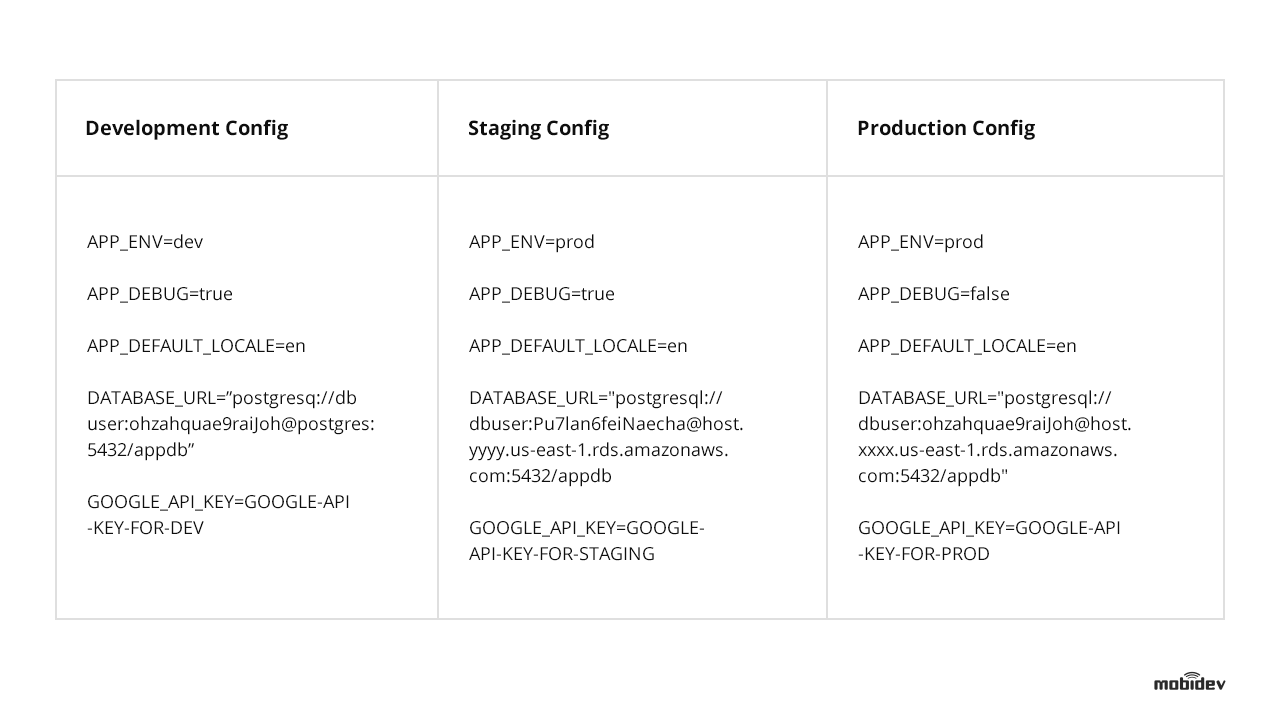
Examples of different environments for web app development
So it doesn’t matter where the web app is deployed because there won’t be any need to change the code. Only proper environment variables have to be set. If you’re using Docker, run different Docker containers from the same image with different environment variables for different deploys.

Principle 4: All the variety of services your web app runs, have to stay detached

The software community verdict is clear. It doesn’t matter if the application uses some third-party back-end services, APIs, or built-in components like a MySQL database. The best practice in this scenario will be to treat them all as attached resources.
Enable software access via a URL or use any of the other methods stored in the configuration. This approach will allow the development team to manage components without making changes to the code.
Symfony development is all about following SOLID principles. For example, to change database storage from MySQL hosted on EC2 instance to Amazon RDS, you just need to change the DSN style URL in the environment configuration without making any changes to the code.
You can even change static storage from Amazon S3 to any other Cloud Storage just by changing the environment variables, without changing the code.
Some libraries support various types of storage with an implemented abstraction layer. Flysystem, for example, supports different types of cloud storage. Doctrine is another example, but it’s abstracted around database storage. So you can switch from MySQL to PostgreSQL after making minor changes to the code.

Principle 5: Build, release, and run each software development stage separately

To ensure stability during all stages of the build, you can leverage automation tools like Gitlab CI and Jenkins.
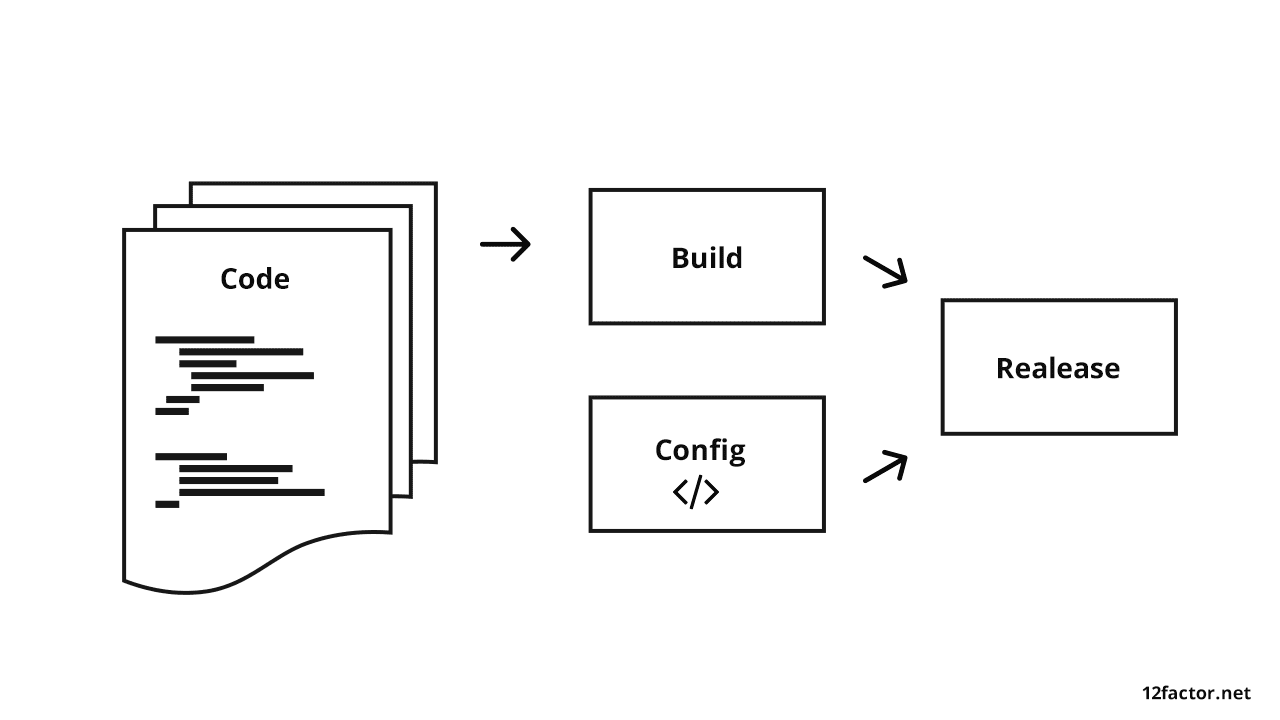
Best practice is to separate staging while app development

SOFTWARE DEVELOPMENT PIPELINE STAGES:

During the build stage – the code must be set, depending on the PHP libraries and CSS/JS assets that need to be prepared. Finally, the Docker container with a version tag has to be built and pushed into the Docker registry. You’ll also have the option of executing unit tests and code sniffer.
At the release stage – combine the Docker container (produced during the build stage) with the configuration for the environment (staging, and/or production) where you will run your build.
At the run stage – execute the app in the selected environment with proper environment configuration. This will be based on the release stage.

Principle 6: Make processes, stateless, and store the data outside the Web application

Leading web development practices recommend the storage of persistent data in separate services. It can be any relational database, for example, like Redis, Amazon S3, and so on.
However, if you’re working with Docker, you don’t have to store all the data inside the container. This is because your app has to be stateless.
Going forward, this approach will be critical to scalability. If you need authorization in your API, you can use stateless JSON Web Tokens, or you can use sessions, but store them in Redis.
The Symfony framework can work both ways, and such techniques enable scalability benefits. For example, you can run one container or hundreds of containers that use the same code and work with the same services.
You can restart your cluster (or a bunch of containers) or run a new one with a new version-without data loss.
At some point during the growth cycle, you’ll need more than one server. At this juncture, the software will start running on several servers using a load balancer.
It’s the best approach to orchestrate the execution of functions and various requests. This is the exact moment when all the processes have to be stateless.
The users will be authorized on one server, but their requests will be pointed to another server to be executed. Unless the authorization service is stateless (and can support both servers), the user won’t be able to continue running the app due to lack of authorization on the second server.

Principle 7: Keep software self-contained and export services via port binding

All web apps have to be made available without dependencies. If an app uses several services, each service has to be made available via separate ports.
Once you run Docker Compose on the developer’s local machine, for example, the application will become available on http://localhost:8085. At the same time, a separate GUI for Database management services will be available on http://localhost:8084.
Such an approach allows us to run many Docker containers and use load balancers (like HAProxy and Amazon Elastic Load Balancing.)
If the development team refuse to follow this approach, it’ll make the launch process more complicated. All the unnecessary (extra) steps may create additional bugs in the system.

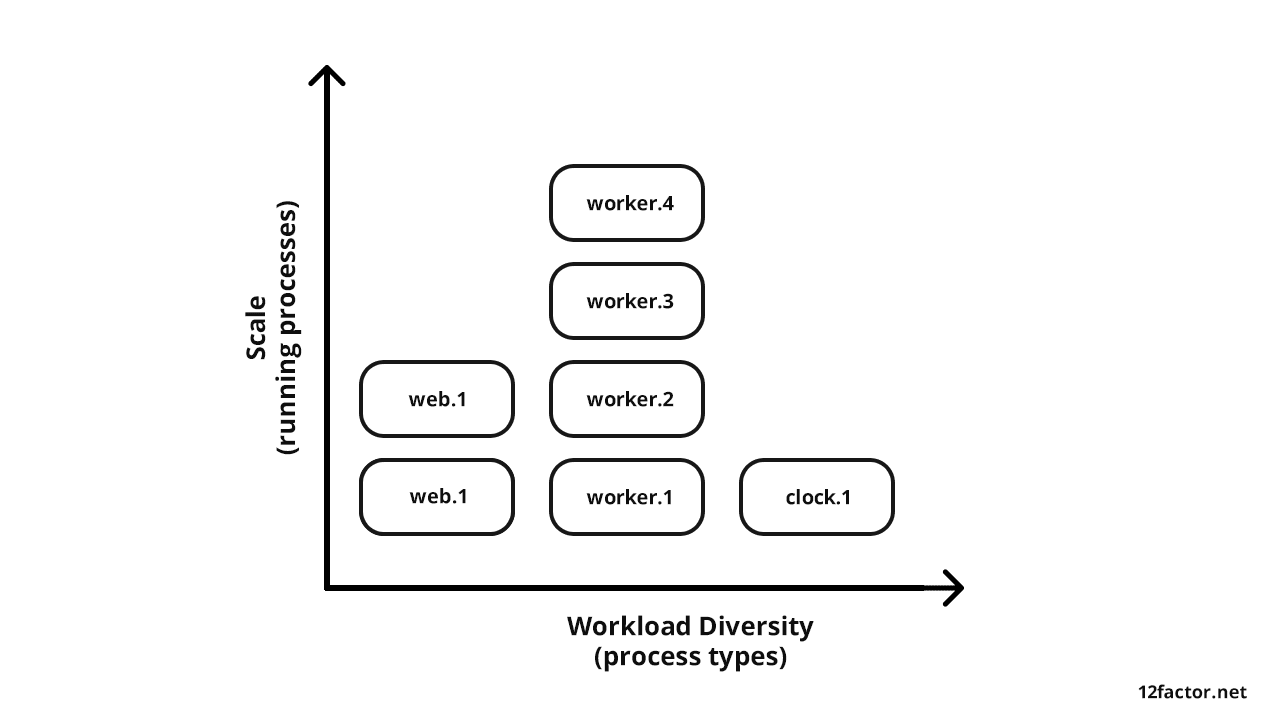
Principle 8: Apply the process model with NO sharing

As the web application is developed, there will be a variety of processes running within the app. However, it’s important to keep all these processes separate. You can even divide these processes into separate ones if some of them are getting “too heavy” to manage.
So nothing has to be shared between several different processes. It’s the best way to keep the application simple and stable. What’s great about this approach to web application architecture is the fact that it makes it easy to scale.

BELOW, YOU’LL FIND THESE RECOMMENDATIONS ILLUSTRATED WITH A PHP DEVELOPED MULTI-TENANT APPLICATION:

  • The app can run as many PHP containers as needed to scale (up or down).
  • It can work for as many clients as needed.
  • If we need to handle more HTTP requests, we can just add more running PHP containers.
  • If we need to handle more background tasks, we can add more containers with background workers to handle these needs.
Multi-tenant web application processes architecture

Principle 9: Stay sustainable with fast launching and shutting down processes

All web applications have to be developed in a manner that enables scaling (up or down) at will. It should be able to run 100 containers, for example, during business hours (when the app users are most active), and run ten containers at night (to save money allocated for the infrastructure).
This approach can be applied to your software product by containing the processes, separately. However, you have to enable them to be launched or terminated rapidly.
That’s why minimization of the launch time for processes is a must. If you use Docker, you can run more PHP containers.
The container image should be ready for launch. Don’t compile at startup, and don’t run PHP Composer during the launch. The time to launch should always be as short as possible.
When you want to scale down, all you have to do is shut down some containers. It’s also critical to shut down the containers without disrupting the system.
Users don’t want to see request timeout or error messages. So use proper termination signals by sending daemons, like in most queue servers.
RabbitMQ and Beanstalkd are great examples that work efficiently in the background and queue the job in case of failure. You should also apply transactions to the Relational Database.

Principle 10: Keep development, staging, and production stages as similar as possible

The development, staging, and production environments have to be as similar as possible. Following this rule will help web application development teams avoid situations like a production software failure (which often happens when the web app was developed under different conditions).
There are some cases where the developer can run an application on a local machine with Docker and use the same Docker containers for staging and production. To use something that works only in the cloud, it’s better to go with the Adapter pattern.
For example, the production Docker cluster uses the same containers that were tested on staging but with different environment variables. The PHP and PostgreSQL versions will be the same (and unchanged), but the latter will run on Amazon RDS.
Log level is different as the users don’t see details about errors like the ones seen on the developer’s machine or staging server. Anyway, we will still receive reports about errors (with error details) in our error log aggregator server. This way, you’ll know about the error before users report it.

Principle 11: Good practice collecting application logsis is to perceive them as event streams

Software engineers should approach logs as event streams and not a steady stream of data that’s headed for storage. It’s the optimal way to reach high-visibility while running an application.
Storing logs as separate files for each Docker container (or separate services) should not be an option for your team.
By default, the Symfony PHP app writes logs on to log files, but you can configure the logs output to Linux stdout/stderr stream. You can do this by setting “php://stderr” string in the log path.
After that, you will be able to see all active logs from the console. Anyway, such an approach will be good for development but not good enough for production. You can see the logs while your Docker container is running but not after the container has been terminated.
For production, I would highly recommend the use of log aggregator services. Sentry, Graylog, Logstash, or Splunk are excellent examples.
Such services can aggregate logs from all running containers and enable analysis from a centralized platform. You can also leverage notifications to be informed about production issues and avoid losing data logs after a crash.

Principle 12: Manage admin activities as one-off processes

Administration and management activities play an integral part in the development and deployment of software products.
Database migrations, operations with cache, creating new system users and backups are just some examples. All these web development principles have to be applied to those activities as well.
Symfony provides a bin/console command to handle admin/management tasks. It’s best to run such commands as a one-off process in the same identical environment as the regular long-running processes of the app. It means that we need to run a new container for just one task instead of using an existing container.
Here’s an example of how Symfony accomplishes database migrations in Docker:
Example of DB migration with Symfony and Docker
We use Docker run, not Docker execute. This command works with the container that’s already running. After the migrations are complete, the Docker container can be exited. This will be a one-off process.

Achieve web application stability and scalability

All the web application development principles mentioned above should act as a baseline for your software development team. Such implementations should also be made wisely and aligned with business priorities.
They should be technically reasonable and seamlessly applicable to specific use cases. If you choose to ignore one or more of these best practices, there should be an excellent reason for it.
The key to a successful web development project is to create a culture of CI. It matters because it’s becoming effortless to automate things like deployments, updates, and setting up infrastructure for new users. Check our Case study on creating Advisory Web Platform For Education & Mentoring with CI.

Conclusion

In conclusion, it’s critical to follow these steps and only divert from it when it’s absolutely necessary. When followed accordingly, these development principles ensure that your software is stable and ready to scale.
It has paid dividends time and again in my software development career and promises to do the same for you in your next web development project.